
How elDoc Helps Critical Infrastructure Build an AI Powered Digital Archive
Critical infrastructure depends on knowledge accumulated over decades. Engineering drawings, equipment specifications, maintenance records, technical reports, and historical documentation help specialists understand how facilities were designed, modified, and maintained.
Yet much of this knowledge remains on paper. Finding a particular drawing can require searching physical folders, interpreting old numbering systems, and consulting colleagues who know the archive. Even when documents have been scanned, inconsistent filenames and missing metadata can make information difficult to retrieve.
The elDoc GenAI Document Excellence Platform provides the foundation for a more useful digital archive: one that combines document preservation, intelligent processing, and AI-assisted access to technical knowledge.
A proposed archive for a critical infrastructure facility illustrates how these capabilities can work together—and how other critical infrastructure organizations can approach the same challenge.
Bringing decades of technical documentation into one environment
Historical technical archives contain far more than standard office documents. Their collections may include large-format engineering drawings, diagrams, handwritten annotations, revision stamps, specifications, and reports produced under different documentation practices.
The proposed project addresses this variety through a coordinated workflow, from scanning paper originals to making their contents searchable through elDoc.
Documents enter a centralized environment where they can be processed, classified, indexed, and made available to authorized users. The original digital copies remain preserved alongside the information extracted from them.
This creates a consistent foundation for both long-term preservation and everyday use. Specialists can access documents through a shared web interface and find them using several attributes, without needing to know where they were originally filed.
Making digitization useful from the start
The first step is capturing the archive accurately.
For the proposed facility archive, this includes scanning documents of different complexity and layout. Small labels, title blocks, tables, stamps, and annotations need to remain readable because they may contain the information required to identify or interpret a document.
Image preparation can include correcting orientation, reducing noise, and improving contrast before recognition begins. Scanning settings and quality checks should be established around the actual condition of the archive.
elDoc’s role begins as these digital materials enter the processing workflow. Preserving the original scan gives users a reference they can inspect even when extracted text or AI-generated interpretations require correction.
Using AI to organize complex documents
Building a digital archive involves understanding what each document contains, assigning it to the right category, extracting useful information, and applying consistent naming and filing rules. Across a large collection, these tasks can account for thousands of hours of manual work.
With the elDoc GenAI Document Excellence Platform, a configured AI workflow processes and organizes documents automatically as they are uploaded. Customers can define their archive structure in advance, including document categories, required metadata, folder placement rules, and naming conventions.
This allows the archive to reflect the organization’s needs. Engineering documentation, for example, could be organized by facility, system, equipment, document type, and revision. AI processing then helps apply that structure consistently across incoming documents.
From Uploaded Files to Organized Archive Records
elDoc Intelligent Document Processing combines OCR, information extraction, and AI-assisted classification to prepare documents for the archive. The workflow can use existing text where available and apply recognition to scanned materials.
| Processing stage | What the configured workflow does | Practical value |
|---|---|---|
| Read the document | Extracts existing text or applies OCR to scanned pages | Makes document content available for processing and search |
| Identify the document type | Analyzes content and, where configured, visual structure | Helps distinguish drawings, reports, specifications, and other records |
| Extract key information | Identifies attributes such as title, document number, date, equipment designation, and revision | Creates structured metadata without entering every field manually |
| Classify the document | Matches extracted information to predefined categories | Applies a consistent classification model |
| Apply naming rules | Uses validated attributes to generate a standardized filename | Makes files easier to identify and manage |
| Determine archive placement | Suggests or assigns a location according to configured rules | Reduces manual sorting and filing |
| Route exceptions for review | Flags uncertain or incomplete information | Directs specialists’ attention to documents that need checking |
For an engineering drawing, the workflow could identify the title block, extract the drawing number and revision, determine the associated equipment, and prepare a filename using the customer’s naming convention. It could then suggest or assign the document to the corresponding archive category.
The level of automation depends on the configured rules and the quality of the source material. Clear, consistent documents may proceed automatically, while faded scans, handwritten annotations, or ambiguous identifiers may require specialist review.
What Manual Migration Can Cost
Consider an archive containing 100,000 documents.
If a person spends an average of 10 minutes per document reading it, identifying its purpose, extracting attributes, choosing a category, placing it in the correct folder, and renaming it, the migration requires approximately 16,667 person-hours.
| Manual migration calculation | Illustrative estimate |
|---|---|
| Documents to migrate | 100,000 |
| Manual effort per document | 10 minutes |
| Total manual effort | 1,000,000 minutes |
| Total person-hours | 16,667 hours |
| Eight-hour working days | 2,083 days |
| Full-time working years at 2,000 hours per year | 8.3 years |
These figures cover document preparation and organization. They exclude scanning, project management, and other migration activities.
How Much Staff Time Could Automation Save
With elDoc, the configured processing steps can run in seconds per document, depending on page count, document complexity, model selection, and available computing resources.
As an illustration, five seconds per document would represent approximately 139 hours of automated processing for 100,000 documents. This is an assumed processing rate, rather than a measured elDoc benchmark, and does not establish the total migration duration.
Staff time should be calculated separately. People still need to define the archive rules, validate results, and resolve exceptions. The table below illustrates potential labor savings at different levels of average human review.
| Average human review per document after automation | Total review effort for 100,000 documents | Potential person-hours saved compared with manual processing | Reduction in document handling effort |
|---|---|---|---|
| 30 seconds | 833 hours | 15,833 hours | 95% |
| 1 minute | 1,667 hours | 15,000 hours | 90% |
| 2 minutes | 3,333 hours | 13,333 hours | 80% |
Figures are rounded. These scenarios assume 10 minutes of manual effort per document and exclude scanning, configuration, training, and migration management. Actual savings should be validated through a representative pilot.
Even when review remains necessary, automation can substantially reduce repetitive handling. Specialists can spend more time checking uncertain results and less time reading every file solely to determine its name and location.
AI Organization Happens During Upload
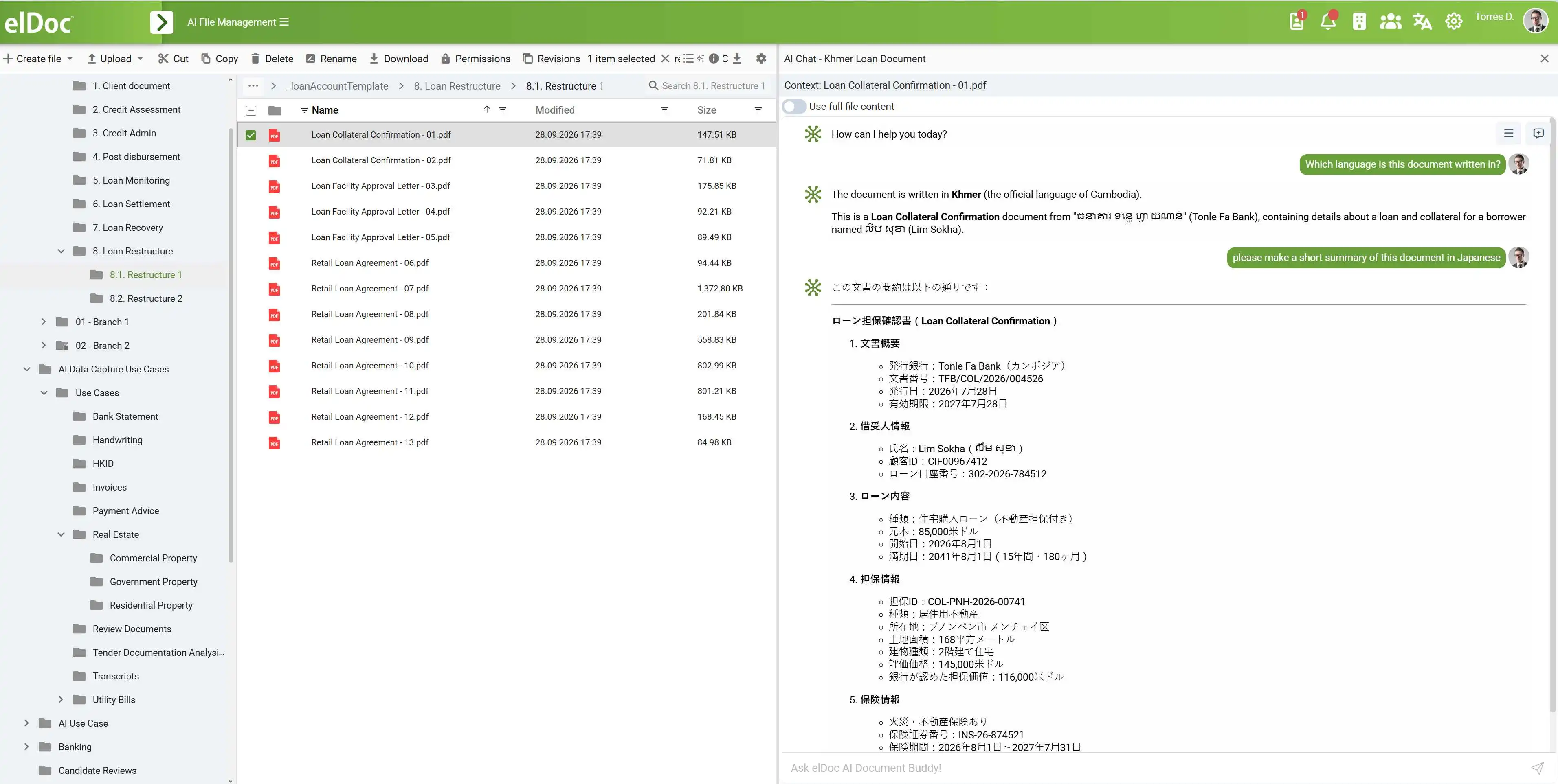
The examples below illustrate how document attributes, categories, and archive placement appear in the user interface. They make the organization process visible and help users understand or review the results.
For a large archive migration, the configured workflow runs automatically during upload. Users do not need to open each document and perform every processing step on screen. OCR, extraction, classification, naming, and placement can run in the background, with uncertain results routed for review.
The resulting archive combines preserved source documents with structured information that makes them easier to find, manage, and use. As new documents arrive, the same configured rules can continue to support consistent organization.
Organizing Documents Through Natural Language Instructions
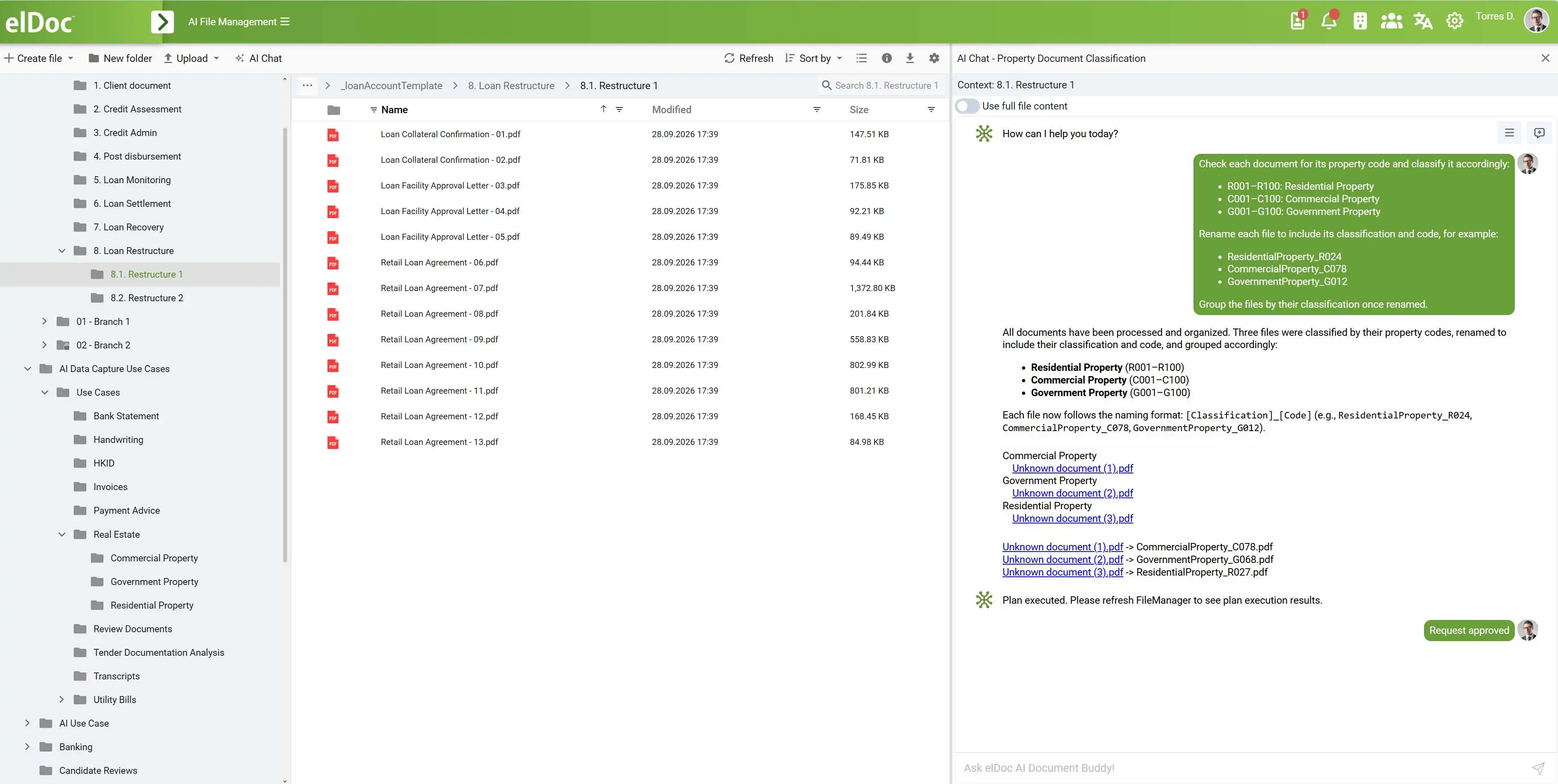
Users can also organize documents directly through the elDoc interface by describing what they want in natural language. This supports both everyday filing tasks and more complex requests involving multiple documents, classification criteria, and naming rules.
For example, a user could ask elDoc to organize a selected collection by equipment type, separate drawings from maintenance reports, and rename files using their document numbers and revisions.
| Complexity | Example instruction |
|---|---|
| Simple filing | “Move these documents to the maintenance reports category.” |
| Classification | “Group these documents by equipment type and separate drawings from technical reports.” |
| Naming | “Rename these drawings using the equipment designation, drawing number, and revision.” |
| Multiple steps | “Organize this collection by facility, system, and document type, apply our naming convention, and flag documents with missing identifiers for review.” |
The complexity of the task depends on the documents, the clarity of the instructions, and the rules that need to be applied. A straightforward request may involve a single category change. A more demanding request may require reading document content, extracting attributes, and resolving ambiguous information before proposing an organizational structure.
This gives customers two complementary ways to organize their archives: automatic processing during upload for large migrations and recurring workflows, and user-directed organization through the interface for selected collections or evolving needs. Depending on the task and configuration, users can review proposed changes and resolve exceptions before they are applied.
Helping specialists find information in different ways
People approach an archive with different levels of knowledge. One engineer may know the exact drawing number. Another may remember a technical phrase. A third may only know the subject they need to investigate.
The proposed elDoc solution supports these situations through three complementary search methods.
Metadata search locates documents using structured attributes such as document number, revision, date, category, or equipment designation.
Full-text search finds words, technical terms, and identifiers in extracted document text.
Semantic search retrieves material related to the meaning of a question, including documents whose wording differs from the user’s query.
In the proposed architecture, Apache Solr supports full-text indexing, while Qdrant stores vector representations used for semantic retrieval. These methods can be combined with metadata filters and relevance ranking.
For specialists, the practical value is a broader route into the archive. They can search with precise identifiers when those are available and use descriptive questions when they are not.
Connecting AI answers to archive evidence
Finding relevant documents is often only the beginning. Specialists may also need to understand a long report, compare revisions, or assemble information from several records.
The proposed solution introduces elDoc AI as the interface for this interaction.
Using retrieval-augmented generation, or RAG, the system retrieves relevant archive material before a language model prepares an answer. Agentic RAG can extend this process through multiple retrieval and analysis steps, including refining a query and gathering related information.
An illustrative request might be:
Find the drawings and technical reports associated with this equipment assembly, and summarize the documented modifications.
The intended workflow would locate relevant records, assemble supporting passages, and prepare a response linked to the source documents.
Those links are essential. Users need to inspect the underlying evidence, confirm the applicable revision, and evaluate the context. For responsible engineering decisions, AI analysis remains an aid to qualified specialists’ review and professional judgment.
Extending automation through AI Document Agents
Preparing and maintaining an archive involves recurring work: identifying document types, checking metadata, locating related records, and preparing collections for review.
The project description identifies AI Document Agents as a potential extension for these tasks.
A configured agent could process a newly uploaded drawing set, extract key attributes, search for related documents, and prepare the results for a responsible specialist. Other agents could help flag missing information or draft structured reports.
These workflows require defined rules, review points, and implementation work. Their scope should follow the organization’s priorities and the findings of an initial archive assessment.
Starting with a focused workflow makes it easier to evaluate extraction quality and review effort before expanding automation.
Keeping documents and AI processing under organizational control
For critical infrastructure, deployment choices matter as much as search functionality.
The proposed architecture places elDoc, storage services, search indexes, and AI models within the customer’s infrastructure. This allows the organization to control where technical documents are stored and processed, without requiring their transfer to external cloud AI services.
The design separates application services, AI computation, distributed data storage, and backup and monitoring functions.
MongoDB holds document records and metadata. Solr and Qdrant support search, while a dedicated AI server handles recognition, embeddings, and language and visual analysis.
Local deployment must be supported by access controls, protected communications, administrative controls, and auditing requirements established during detailed design. Users should receive access according to their roles and responsibilities.
Preserving the archive through reliable storage and recovery
An archive must remain available and recoverable over time.
The proposed solution combines distributed storage and replication with a separate backup and monitoring function. Replication supports availability when individual infrastructure components fail. Backups provide a recovery path for incidents such as accidental deletion or logical corruption that may affect replicated data.
The final configuration, backup schedule, retention periods, and recovery procedures should reflect the organization’s requirements and be verified through recovery testing.
This operational foundation protects the documents on which search and AI capabilities depend.
Turning preserved records into accessible technical knowledge
The value of an AI-powered digital archive lies in how effectively people can use the information it preserves.
With elDoc, the proposed approach connects accurate digitization, structured metadata, complementary search methods, and source-linked AI assistance in one document environment.
For critical infrastructure organizations, this creates a path toward easier access to historical records, less manual processing, and better continuity of technical knowledge as experienced personnel move on.
A practical starting point is a representative pilot collection. Use it to establish scanning quality, validate extracted attributes, test real search questions, and evaluate whether AI responses lead users to the correct evidence.
From there, the archive can expand around demonstrated quality and operational needs—giving specialists a dependable way to access the knowledge their organization has built over decades.
Build Your AI Powered Digital Archive with elDoc
Start with your existing document collection, define how you want it organized, and let elDoc AI handle the configured processing workflow. From migration planning to intelligent knowledge search, elDoc can help turn your archive into a structured, accessible information resource.
1. Assess Your Document Collection and Size the Storage
Assess the number of documents and pages, their formats, and the proportion of large-format drawings, scanned images, and existing digital files. Consider expected growth as new documents enter the archive.
Use this assessment to calculate storage requirements for original files, processed copies, metadata, and search indexes, together with replication and backup capacity.
The outcome: A storage and infrastructure plan sized around your archive and its expected growth.
2. Optimize Scanning and Migration
During migration planning, elDoc can help recommend scanning resolutions appropriate to your document types. The aim is to preserve readable text, fine drawing details, and annotations while avoiding unnecessarily large files.
Define scanning profiles and quality checks for different materials, then prepare documents for upload and automated processing.
The outcome: A digitization approach that balances image quality, recognition needs, and storage efficiency.
3. Define How Documents Should Be Archived
Specify your preferred archive structure, document categories, required metadata, naming conventions, and placement rules. You can use an established organizational structure or define one around facilities, systems, equipment, and document types.
Agree on access permissions and identify situations that require human review, such as missing identifiers or uncertain revisions.
The outcome: Clear rules that guide consistent document organization and secure access.
4. Let elDoc AI Process and Organize the Documents
Once the rules are configured, elDoc AI can process documents automatically as they are uploaded. The workflow can read document content, extract attributes, classify records, apply naming conventions, and suggest or assign the appropriate archive location.
| Automated activity | Purpose |
|---|---|
| OCR and content extraction | Make scanned information readable and searchable |
| Metadata extraction | Capture titles, identifiers, dates, equipment references, and revisions |
| Classification | Organize documents using your defined categories |
| Naming and placement | Apply consistent filenames and archive locations |
| Search indexing | Prepare content for full-text and semantic retrieval |
| Exception routing | Send uncertain results to authorized users for review |
The outcome: An organized, searchable archive with manual attention focused on exceptions.
5. Give Users a Short Practical Training Session
Prepare users to work with the archive through a focused session covering the tasks they will perform each day.
| Training topic | What users learn |
|---|---|
| AI knowledge search | Ask natural language questions, find relevant information, and inspect supporting documents |
| AI Document Agents | Run configured agents for document processing, organization, and analysis |
| Secure archive access | Access and work with documents according to their assigned permissions |
| Reviewing AI results | Check source references and resolve items requiring human judgment |
The outcome: Users ready to retrieve information, run configured AI workflows, and access the archive securely.
Contact the elDoc team to assess your document collection, calculate storage requirements, and define your archiving rules—then let elDoc AI take care of the configured processing and organization.