
Improving Document Data Capture Accuracy with AI Prompts and LLM Configuration

Extracting data from documents is no longer the hardest part of document automation.
Modern AI can recognize invoices, contracts, purchase orders, bank statements, identity documents, forms, correspondence, and many other document types with impressive accuracy. But extracting a value is not the same as producing reliable, business-ready data.
A model may correctly read 12,500.00 from a document, while still failing to understand whether it represents a subtotal, tax amount, invoice total, credit limit, or something else entirely.
This is where the configuration of Generative AI becomes important.
With platforms such as elDoc, organizations can go beyond traditional OCR and configure AI according to the meaning of documents and data. This includes:
- AI Prompts at the Document Type level
- AI Prompts at the individual Field level
- selection of the appropriate LLM for different Document Types
- configuration of LLM temperature according to the task
- validation and cross-checking of extracted information
- business rules and deterministic controls around AI outputs
- Human-in-the-Loop validation where required
The objective is not simply to extract more data. It is to produce more accurate, consistent, validated, and usable enterprise data.
Start with the Document Type and AI Document Classification
Different documents require different AI behavior.
An invoice is not processed in the same way as a contract. A bank statement is different from an identity document, while even documents that look almost identical may need to be classified differently based on their content, business context, or specific identifiers.
For this reason, AI configuration should begin at the Document Type level.
With Generative AI, document classification does not need to rely only on document layout, keywords, or predefined templates. An AI prompt can define specific business logic that determines how documents should be recognized and classified.
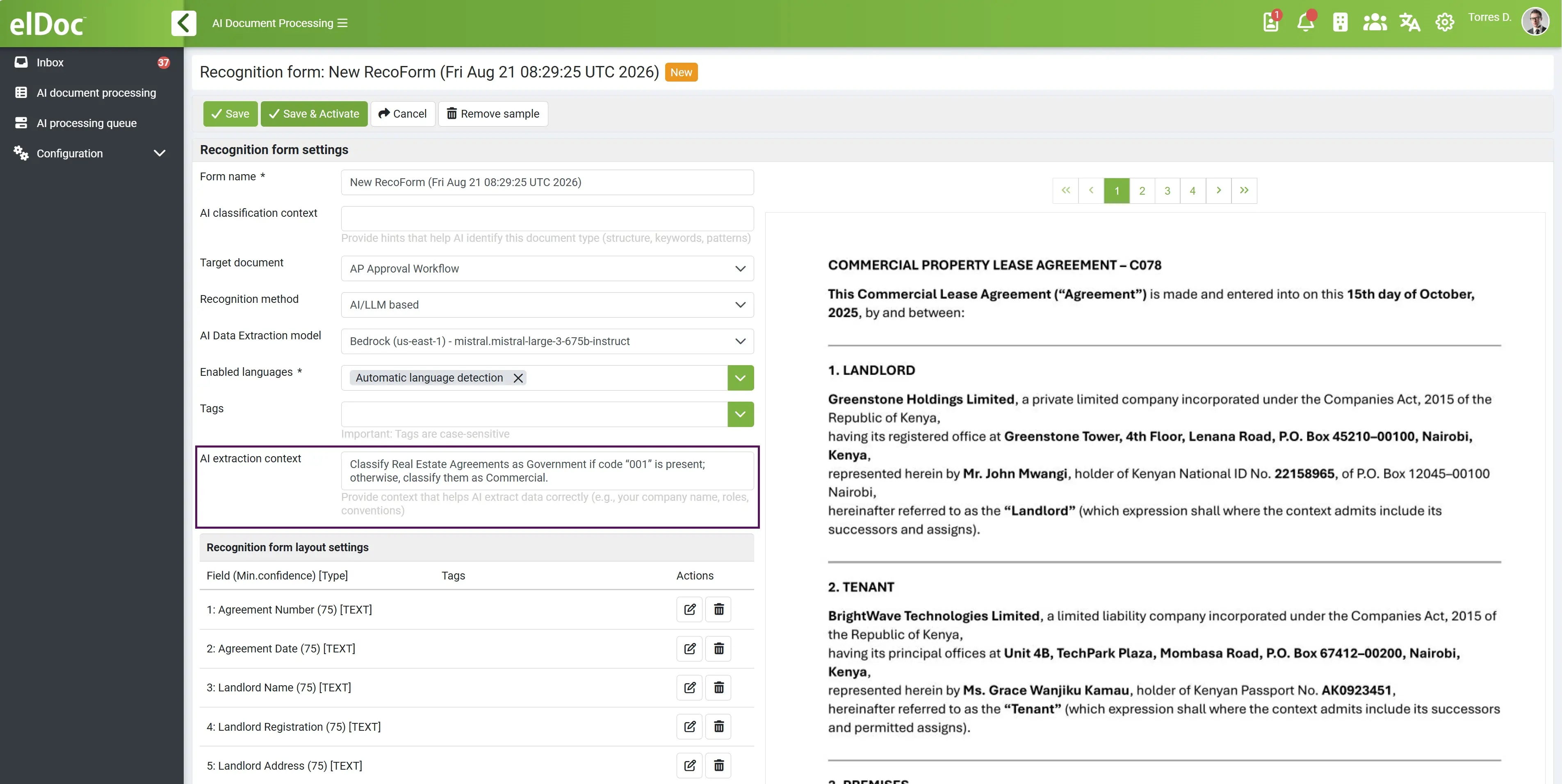
For example, an organization may process several categories of agreements that have very similar structures. Instead of trying to distinguish them visually, the classification prompt can instruct AI to analyze a particular contract code:
Analyze the document and identify the contract code. If contract code 003 is present, classify the document as Commercial Agreement. If contract code 002 is present, classify it as Government Agreement. If contract code 001 is present, classify it as Framework Agreement. Do not determine the document type based only on the document title or visual layout. If none of the specified codes can be reliably identified, classify the document as General Agreement.
The classification logic can be made considerably more sophisticated. AI can consider multiple pieces of information simultaneously, for example:
Classify the document as Government Agreement when code 002 is identified or when the contracting counterparty is a government authority and the document contains a public procurement reference. If conflicting indicators are present, do not make an assumption and classify the document as General Agreement.
This is an important difference between conventional document classification and AI-powered document classification.
Traditional classification often asks:
“What type of document does this look like?”
Generative AI can instead be instructed to determine:
“What type of document is this according to our business rules and the information contained within it?”
Classification prompts can therefore incorporate document codes, identifiers, counterparties, terminology, contractual clauses, monetary values, dates, business context, or combinations of multiple conditions.
Document classification therefore becomes the first layer of data quality: correctly understanding what the document is before deciding what information should be captured from it.
Use AI Prompts for Validation, Not Only Extraction
One of the most valuable applications of Generative AI is using it to validate extracted information.
For example, after extracting invoice values, AI can be instructed to check whether:
Subtotal + Tax − Discounts = Total Amount
It can also compare related information elsewhere in the document.
A field prompt might specify:
Extract the invoice total and verify it against the subtotal, applicable taxes, discounts, and other adjustments shown on the invoice. If the calculated amount does not correspond to the stated total, return 0 value for validation.
Similar logic can be applied across many document processes:
| Document | Example AI Validation |
|---|---|
| Invoice | Validate subtotal, tax and total |
| Purchase Order | Compare line totals against PO total |
| Contract | Compare stated dates with contractual periods |
| Bank Statement | Reconcile opening balance, transactions and closing balance |
| KYC Document | Compare names, dates and identifiers across documents |
| Application Form | Identify missing or contradictory information |
| Insurance Claim | Compare claimed values against information provided in supporting documents |
This creates an important distinction between AI extraction and AI-assisted data quality.
Configure AI to Handle Missing and Ambiguous Information
A major source of poor data quality is not incorrect OCR. It is incorrect assumptions — or critical information simply not being present in the document.
If AI cannot find a value, an unconstrained model may attempt to infer it from surrounding information. That may be useful in some scenarios but unacceptable in others. For business-critical fields, it is often better to return no value than to populate the system with information that cannot be reliably supported by the document.
This behavior can be configured through field settings. For example:
Extract the Customer Tax ID exactly as stated in the document. Do not infer, generate, or derive the value from other information. If the Customer Tax ID is not present or cannot be reliably identified, return no value.
But sometimes returning an empty value is only the beginning of the process.
If a particular field is mandatory for the business process, it can be configured accordingly. When AI returns no value for a mandatory field, the system can automatically trigger a validation or exception-handling workflow instead of allowing the document to proceed through Straight-Through Processing.
For example, a mandatory Customer Tax ID may simply not exist anywhere in the received document. AI cannot extract information that is not there. In this case, the document can be automatically routed to a user for review.
This creates an important distinction:
AI extraction determines what information can reliably be obtained from the document. Business validation determines whether that information is sufficient to continue the process.
The same approach can be applied to ambiguous information. For example:
If multiple bank account numbers are present, select the account explicitly identified for payment. If it cannot be reliably determined which account should be used, do not select one arbitrarily. Return no value.
With this approach, missing or ambiguous information does not silently become poor-quality enterprise data. Instead, it becomes a controlled exception that can automatically trigger the appropriate validation process and Human-in-the-Loop review.
A good AI configuration therefore defines not only what AI should extract, but also what it should not assume and what should happen when required information cannot be reliably obtained from the document.
Select the Right LLM for Each Document Type
There is another important configuration decision: which model should process the document?
Not every document requires the same LLM.
Different models can have different strengths in reasoning, visual document understanding, multilingual processing, speed, context-window size, deployment architecture, data residency, and cost.
With an LLM-agnostic architecture, organizations do not necessarily have to select one model for every document-processing scenario.
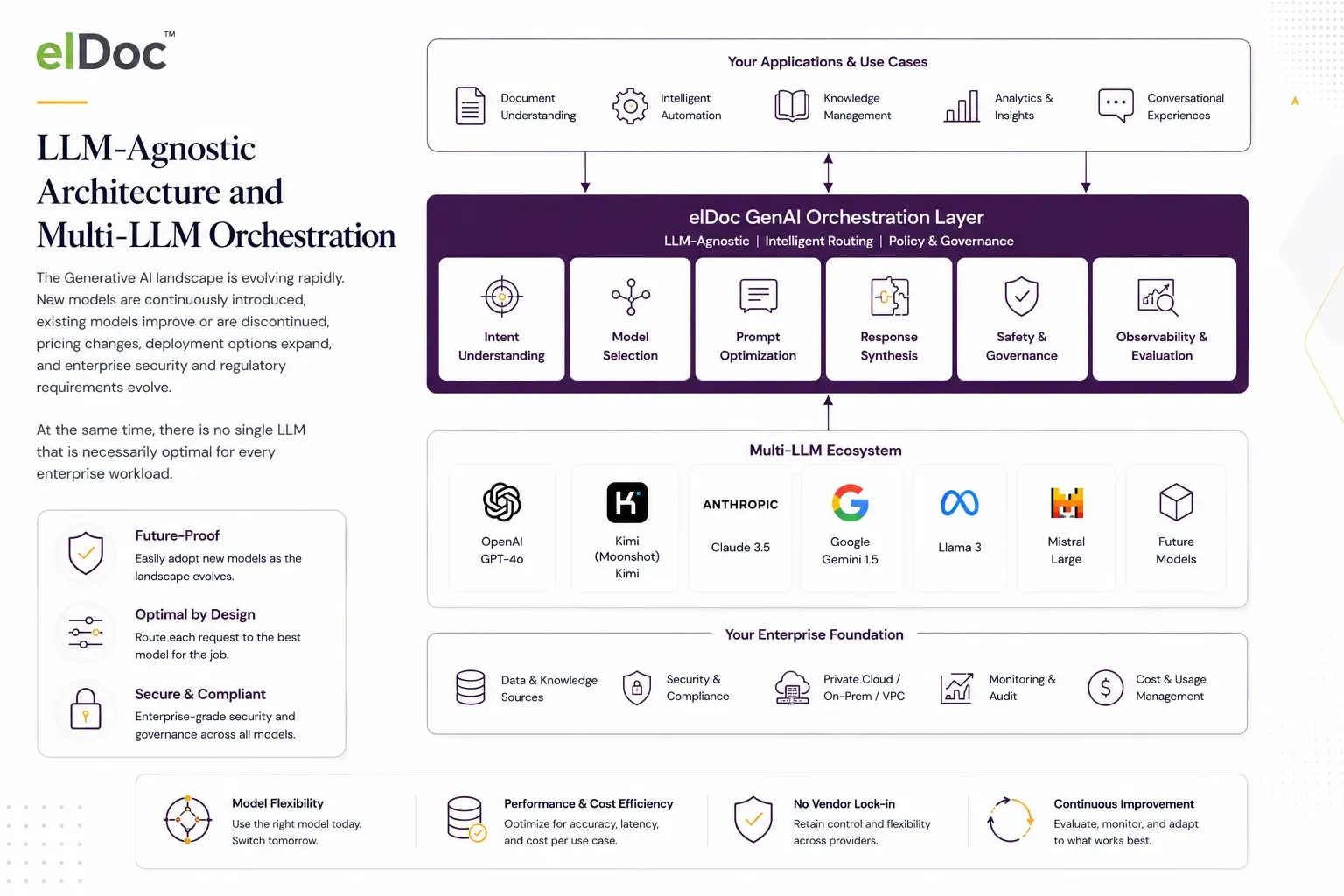
Instead, model selection can be aligned with the Document Type and business requirements.
| Document Type | Model Requirement |
| Standard invoices | Fast, accurate and cost-efficient extraction |
| Complex contracts | Strong reasoning and large context window |
| Scanned forms | Strong visual/document understanding |
| Multilingual documents | Strong multilingual capabilities |
| KYC documents | High accuracy, visual understanding and controlled processing |
| Correspondence | Strong semantic understanding and classification |
| Large financial reports | Large context and analytical reasoning |
A company processing hundreds of thousands of relatively standardized invoices, for example, may prioritize speed, accuracy, and processing cost.
For complex legal agreements, the organization may prefer a more capable reasoning model even if inference takes longer.
Model selection therefore becomes another instrument for improving both data quality and processing efficiency.
Configure LLM Temperature According to the Task
After selecting an LLM, another parameter that can influence its behavior is temperature.
In simple terms, temperature controls the degree of randomness in how a model selects the next token when generating a response. The model calculates a probability distribution over possible next tokens; temperature modifies that distribution before a token is selected.
At a lower temperature, the probability distribution becomes sharper. The model is more likely to select high-probability responses, which generally makes its output more consistent, predictable, and repeatable.
At a higher temperature, the probability distribution becomes flatter. More alternative tokens become plausible, increasing variation and diversity in the generated response.
A useful way to think about it is:
Lower temperature → prioritize consistency and precision.
Higher temperature → allow more variation and exploration.
Temperature does not directly mean accuracy or intelligence. Setting temperature to 0 does not guarantee that an answer is correct, and increasing temperature does not make a model reason better. It primarily changes the variability of generation.
What Temperature Should Be Used for Document Processing?
For most enterprise document-processing tasks, the desired behavior is very different from creative content generation.
When extracting an invoice number, VAT amount, customer name, contract date, IBAN, purchase order number, or other structured information, there is usually one correct answer.
If an invoice number is INV-2026-00482, the organization does not want the model to provide different interpretations on different processing runs.
For these tasks, a low temperature is generally the appropriate starting point.
| Temperature | Typical Behavior | Suitable Document & AI Scenarios |
|---|---|---|
| 0–0.0 | Highly deterministic and focused | Field extraction, invoice numbers, dates, amounts, IDs, document classification, rule-based checks |
| 0.1–0.3 | Mostly consistent with limited flexibility | Clause identification, entity recognition, document interpretation, compliance analysis |
| 0.3–0.5 | More flexible language and interpretation | Document summaries, correspondence analysis, explanation of findings |
| 0.5–0.7 | Greater variation and broader formulation | Drafting responses, generating descriptions, producing alternative explanations |
| 0.7+ | High variability and creativity | Brainstorming and creative content generation; generally less suitable for structured enterprise document extraction |
These ranges are indicative rather than universal. Temperature scales and behavior vary between models and providers, and some newer reasoning models may restrict temperature or use different controls altogether.
Temperature 0–0.0: Structured Data Capture
This range is particularly suitable when AI is expected to return a specific value already contained in a document.
For example:
Extract the invoice number exactly as it appears on the document. Do not include labels or additional text.
Other examples include:
- invoice and purchase order numbers;
- dates and monetary amounts;
- tax and registration numbers;
- customer and supplier identifiers;
- bank account details;
- predefined document classification;
- structured output.
The objective is not creativity. It is to produce the same reliable interpretation of the same information as consistently as possible.
Temperature 0.1–0.3: Controlled Interpretation
Some document-processing tasks require interpretation rather than simple extraction.
For example, AI may need to determine whether a contract contains an automatic renewal provision, identify a termination clause, classify an expense, or determine whether particular compliance requirements are satisfied.
Here, limited flexibility can be useful because the same concept may be expressed in many different ways.
For example:
Determine whether the agreement contains an automatic renewal provision. If present, identify the renewal period and required notice for non-renewal.
The answer still needs to be controlled and evidence-based, but the AI must interpret language rather than simply locate an exact value.
Temperature 0.3–0.5: Summarization and Semantic Analysis
A moderate temperature can be appropriate where there is no single exact wording expected from the model.
Examples include:
- summarizing contracts;
- explaining document discrepancies;
- interpreting customer correspondence;
- summarizing insurance claims;
- describing compliance findings;
- explaining why a document was routed for validation.
For example:
Summarize the main commercial obligations contained in this agreement in five concise points.
There can be several equally valid ways to formulate such a summary, so some variation may be acceptable.
Temperature 0.5 and Above: Generative Tasks
Higher temperatures become more relevant when the objective moves away from data capture and validation toward content generation.
For example, AI might use information extracted from documents to draft a customer response, prepare an explanatory narrative, generate alternative descriptions, or create communication based on the processed data.
Greater variation can be beneficial in these scenarios.
However, for business-critical document extraction, higher temperatures should generally be approached carefully because variation is usually not a desirable characteristic of data capture.
Temperature Should Be Configured Together with the Prompt
Temperature should not be considered in isolation.
A low temperature cannot compensate for an ambiguous prompt.
For example, asking:
Find the relevant date.
is ambiguous regardless of temperature.
A much stronger instruction would be:
Extract the invoice issue date. Do not return the payment due date, delivery date, purchase order date, or document processing date. Return the value in YYYY-MM-DD format. If the invoice issue date cannot be reliably identified, return no value.
Combining a precise Field-Level AI Prompt with an appropriately low temperature gives the model much clearer boundaries for the expected output.
The same principle applies to document classification, validation, and analysis.
There Is No Universal “Best” Temperature
It can be tempting to search for one optimal temperature and apply it across every AI process. In practice, the appropriate configuration depends on the task.
An enterprise may therefore use different configurations within the same document-processing environment:
Invoice Number → Temperature 0
Invoice Classification → Temperature 0.1
Contract Clause Analysis → Temperature 0.2
Contract Summary → Temperature 0.4
Draft Customer Communication → Temperature 0.6
The important principle is to configure the model according to the expected nature of the answer.
When there should be one precise answer, favor lower temperature. When multiple valid formulations or interpretations are useful, more temperature can be appropriate.
For AI-powered document processing, this means that structured data capture, classification, and validation will typically operate toward the lower end of the temperature range, while summarization and generative scenarios can allow progressively greater flexibility.
Ultimately, temperature is another configuration layer that — together with LLM selection, Document Type Prompts, Field-Level Prompts, validation rules, and Human-in-the-Loop controls — helps organizations align AI behavior with the data quality requirements of each document-processing scenario.
Configure AI Without Being an AI Expert
Improving AI-powered document processing should not require data scientists, prompt engineers, or lengthy AI projects.
With elDoc, these capabilities are designed to be configurable by regular business users. Users who understand their documents and business processes can simply instruct AI on what to look for, how to interpret information, what should be considered valid, and what to do when information is missing or ambiguous.
Document Types, AI classification instructions, Field-Level AI Prompts, LLM selection, temperature, mandatory fields, validation logic, and Human-in-the-Loop processes can all work together to continuously improve the quality of data captured from documents.
And organizations do not have to start from zero. As a GenAI-powered platform, elDoc provides out-of-the-box document understanding and data capture capabilities from day one — without training traditional extraction models or creating templates for every document layout. Additional configuration allows organizations to adapt AI behavior to their specific documents, terminology, business rules, and data-quality requirements.
The principle is simple: you do not need to become an AI expert to tell AI what your business needs.
Talk to an elDoc expert to discover how elDoc can deliver value from day one while giving your teams the flexibility to continuously improve AI-powered document recognition, data capture, and validation.