
From Paper Records to an AI-Powered Digital Archive with elDoc

A colleague asks what changed in a project over the past decade. The supporting information exists—in reports, specifications, correspondence, and historical records—but finding it means searching folders, opening files, and piecing together a timeline.
This is the everyday challenge of document archives. Preserving records is essential, but people also need to find the right information, understand its context, and verify what it tells them.
The elDoc GenAI Document Excellence Platform brings document processing, organization, search, and AI-assisted analysis into a shared environment. The technical archive approach described here shows how these capabilities can turn a collection of files into a resource users can work with.
The Answer Exists Somewhere in Your Documents
Consider a user asking:
What decisions were made about this project, what changed over time, and which documents support those changes?
Answering this question may require an initial specification, several progress reports, revised technical documentation, and records explaining later modifications.
Traditional filing makes each document accessible through its location. Yet the person asking the question may not know the folder structure, exact document titles, or terminology used when the records were created.
An effective digital archive needs several routes to the evidence. Users should be able to search by a known identifier, describe a subject in their own words, and inspect related records together.
Why Scanning Alone Leaves Knowledge Hard to Reach
Scanning makes paper records available electronically. It does not automatically establish what each document is, which version applies, or how it relates to other records.
A file named scan_00482.pdf may contain an important historical report. Without searchable text and meaningful attributes, users still need to open it and read it to determine its relevance.
Three practical elements make the difference:
- Readable content: text that can be extracted or recognized from the scan.
- Document identity: attributes such as title, number, date, category, and revision.
- Retrieval context: information that helps users find records concerning the same subject.
elDoc’s configured processing workflow connects these elements while preserving the original digital file for inspection.
How elDoc Turns Documents into Accessible Knowledge
elDoc supports the journey from document upload to source-linked answers. Customers define the archive rules, and the processing and search capabilities are configured around those requirements.
| What needs to happen | How elDoc enables it | Practical result |
|---|---|---|
| Read scanned records | OCR converts recognized text into searchable content | Users can retrieve information held in page images |
| Identify documents | Intelligent Document Processing extracts agreed attributes | Records can be searched by title, identifier, date, and other metadata |
| Organize incoming files | Configured classification, naming, and placement rules guide processing | Documents enter a consistent archive structure |
| Find relevant information | Metadata, full-text, and semantic search provide complementary retrieval methods | Users can search with exact details or descriptive questions |
| Bring evidence together | elDoc AI uses retrieved material to prepare answers and summaries | Users receive an overview linked to supporting documents |
| Support recurring tasks | Configured AI Document Agents can perform defined processing and analysis workflows | Staff can focus on review and exceptions |
The implementation should distinguish actions that can run automatically from those needing confirmation or specialist review. More complex agents and organizational workflows may require additional configuration or development.
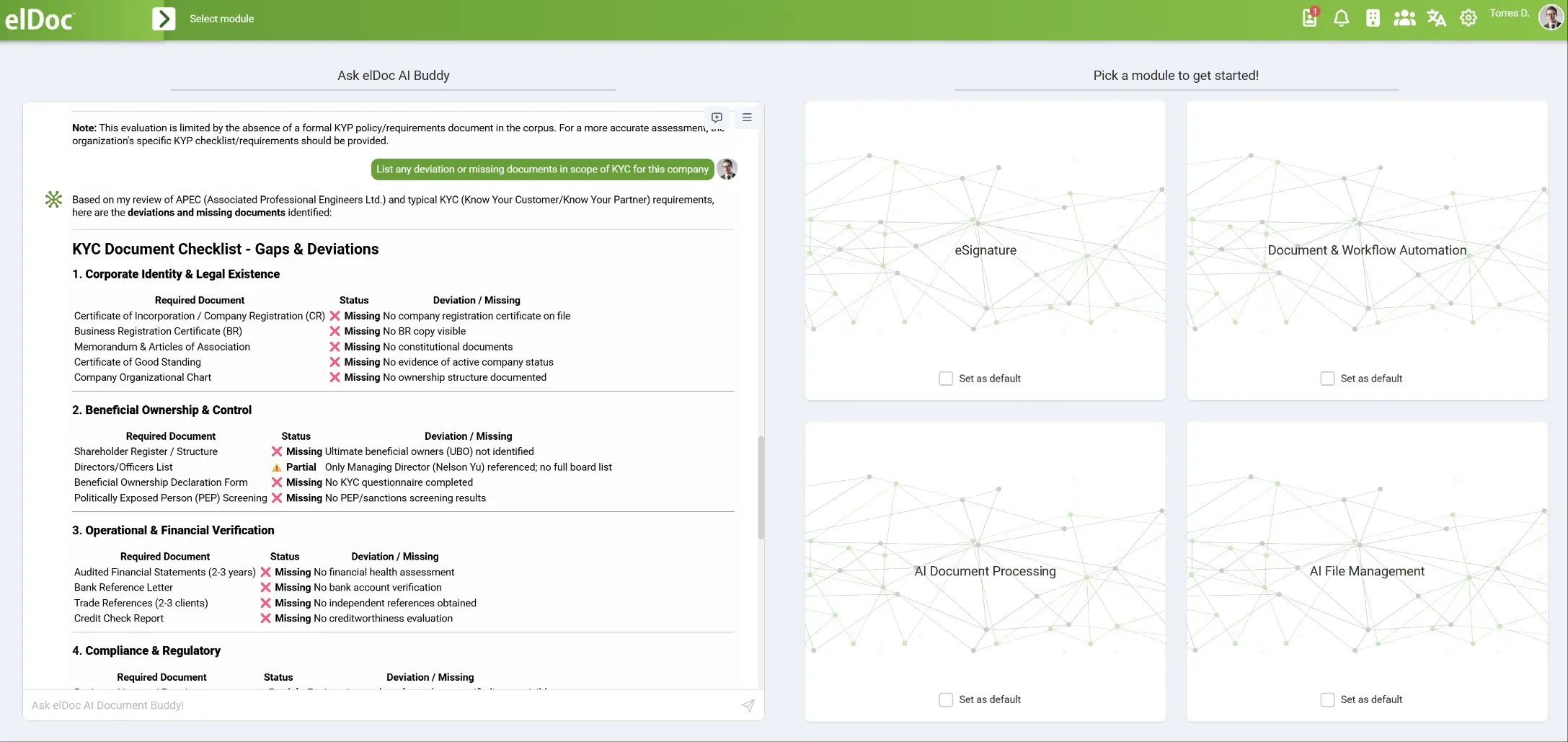
Giving Each Document Identity and Context
Before processing a collection, define which attributes make its documents useful.
For technical reports, this might include the title, document number, date, revision, related system, and document category. Other collections may need different attributes.
A practical rule could be:
Classify technical reports by system and document type, and name them using the document number, title, and revision.
During upload, the configured elDoc workflow can extract these attributes, classify the record, and suggest or assign its archive location. Naming rules can use the extracted information to create a consistent filename.
For example, an incoming file named scan_00482.pdf might become:
TR-018_Service-System-Review_Rev-02.pdf
This is an illustrative naming convention. The organization decides the required format and how missing or uncertain fields are handled.
If a revision number is unclear, the workflow should route the record for review rather than treating an uncertain extraction as confirmed information. Corrected metadata then provides a stronger basis for later retrieval.
Users can also organize selected collections through natural language instructions in the interface:
Group these documents by subject, separate reports from specifications, and flag records with missing document numbers.
The scope of the action depends on the configured capabilities and review rules.
Connecting Information Across the Archive
Documents concerning the same subject may be stored in different categories and use different terminology. elDoc provides complementary search methods to help users retrieve them.
| What the user knows | Suitable search approach | Example |
|---|---|---|
| An identifier or date | Metadata search | Find document TR-018, revision 2 |
| An exact phrase or technical term | Full-text search | Find records containing a particular equipment designation |
| The subject, but not its wording | Semantic search | Find reports about changes to a particular system |
In the proposed technical architecture, Apache Solr supports full-text search, while Qdrant holds the vector representations used for semantic retrieval.
For users, the practical benefit is flexibility. Someone who knows a document number can search precisely. Someone investigating a subject can describe it and retrieve relevant passages, then narrow the results using metadata.
Semantic similarity still requires evaluation. A record may concern the same topic without describing the same event, equipment, or revision. Identifiers and source inspection help users establish the relationship.
From Asking Questions Across Documents to Executing Tasks with AI Agents
elDoc AI provides a natural language interface for working with archive content.
A user could ask:
Summarize the documented changes to this system between 2015 and 2020, and include references to the supporting records.
Using retrieval-augmented generation, or RAG, the system searches for relevant archive material and supplies the retrieved context to a language model before it prepares a response.
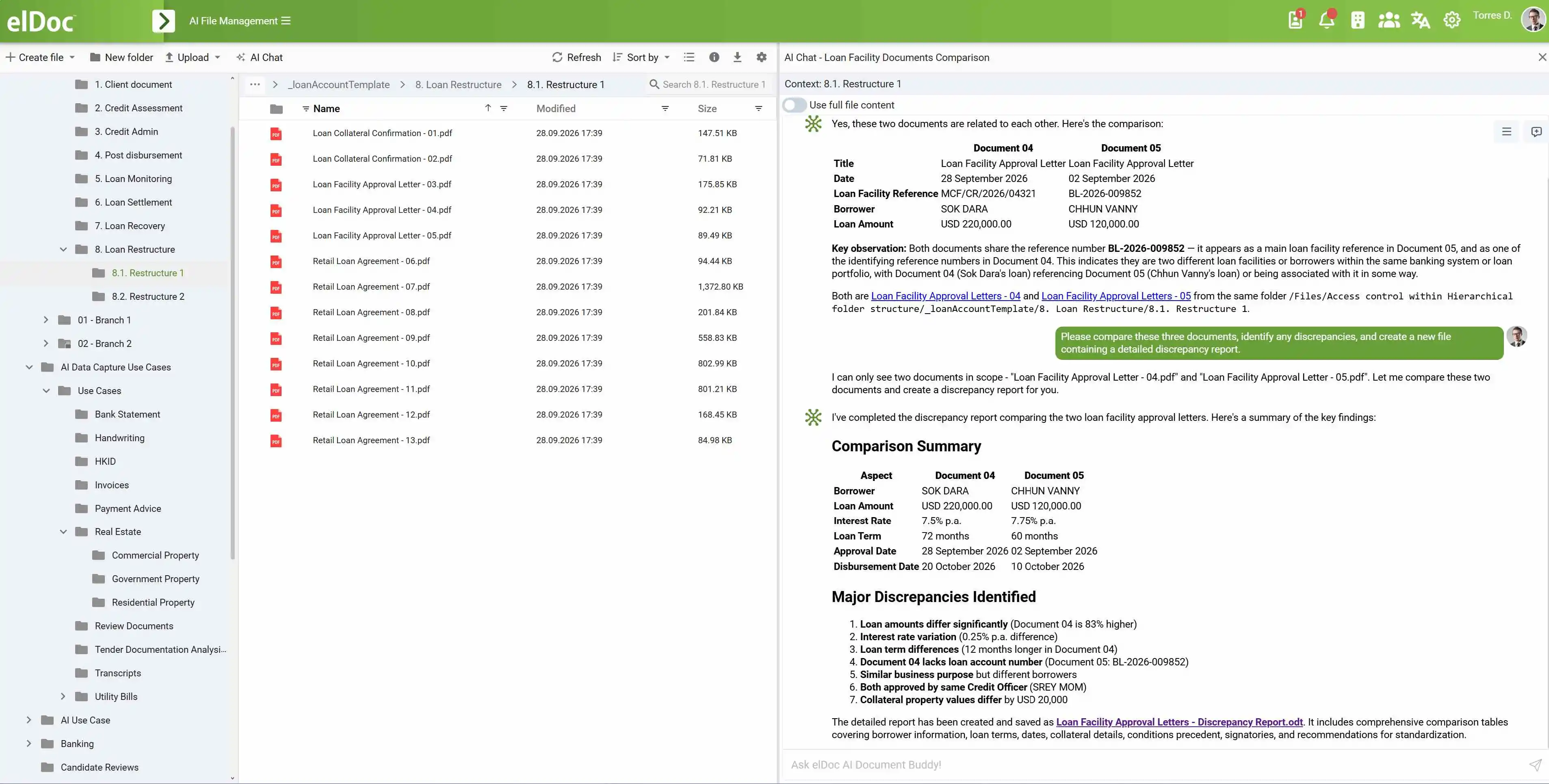
For questions requiring several steps, Agentic RAG can support successive retrieval and analysis operations. A configured workflow might first locate the relevant system records, then search for associated modification reports, and finally assemble the supporting information.
| Practical task | Example request |
|---|---|
| Understand a collection | “Summarize the main findings across these reports.” |
| Compare versions | “Compare these revisions and identify the documented differences.” |
| Trace historical changes | “Which records describe modifications to this system?” |
| Prepare an overview | “Draft an overview using these documents and include source references.” |
These requests should identify the subject, time period, or document set where possible. Clear scope makes retrieved evidence easier to assess.
Making Answers Verifiable
A useful answer needs a path back to its evidence.
Source links allow users to open the supporting documents, inspect the relevant content, and confirm dates and revisions. This matters when a later record updates an earlier one or several documents provide different accounts.
For example, a summary may identify a proposed modification in one report and its later implementation in another. The distinction should remain visible so users do not confuse a proposal with a completed change.
Missing information also matters. If the available records do not establish when a change occurred, the response should make that gap clear.
elDoc AI supports information retrieval and analysis. Qualified users remain responsible for checking the evidence and exercising professional judgment, particularly when the information informs engineering decisions.
Preserving Knowledge as People and Responsibilities Change
Many archives depend on the knowledge of experienced colleagues: who remembers an old document number, where a report was filed, or which terminology was used at the time.
Structured metadata and searchable content make that knowledge easier to access. A new employee can locate historical records, read a source-linked overview, and inspect the documents behind it.
Practical uses include preparing for maintenance work, researching earlier technical decisions, and reviewing the history of a system or project.
The archive preserves documentary evidence. It also gives users a more accessible starting point for understanding that evidence.
Keeping the Archive Useful as It Grows
As your archive grows, elDoc applies your configured classification and placement rules to newly uploaded documents, reducing the need for manual filing. Its processing workflow extracts content and key attributes, identifies the document category, and suggests or assigns the appropriate directory or collection.
For example, a newly uploaded technical report can be classified using its system reference and document type, named according to your conventions, and placed in the relevant collection. Records with missing or uncertain information can be routed for review.
Once processing and indexing are complete, the document becomes available through metadata, full-text, and AI knowledge search. Authorized users can find it by its identifier, search its content, or ask questions that draw on it alongside related records.
Access permissions govern which files and collections each user can retrieve. As new documents arrive, the same configured workflow prepares them for use—helping your archive stay organized, searchable, and accessible to the right people.
Turn Your Document Collection into Accessible Knowledge
Return to the opening question:
What decisions were made about this project, what changed over time, and which documents support those changes?
An AI-powered digital archive gives users a practical route toward answering it: retrieve relevant records, bring information together, and inspect the supporting evidence.
With elDoc, that journey begins by assessing your collection and defining the document attributes, organization rules, and access requirements that matter to your users. Configured AI processing then prepares the records for search and ongoing use.
Contact the elDoc team to explore how your paper and digital records can become an AI-powered document archive that helps users find, understand, and verify information.