
How to Deploy an LLM On-Premises and Connect It to Local Enterprise Repositories

Generative AI is transforming how organizations search, understand, and use enterprise information. However, for government agencies, financial institutions, critical infrastructure operators, healthcare organizations, and other regulated industries, sending sensitive documents to public AI services may not be acceptable.
These organizations need a different approach: deploying Large Language Models within their own infrastructure and securely connecting them to local document repositories, databases, and business systems.
An on-premises LLM deployment gives an organization greater control over data sovereignty, security, model selection, system performance, and regulatory compliance. But installing an LLM inside a private environment is only one part of the solution.
To create real business value, the model must also be connected to trusted enterprise knowledge, operate within existing access permissions, and support practical business tasks.
This article explains how organizations can deploy an LLM on-premises and connect it securely to local repositories through an enterprise-grade Generative AI architecture – elDoc.
What Is an On-Premises LLM Deployment?
An on-premises LLM deployment means that the language model and its supporting AI services operate within infrastructure controlled by the organization.
This infrastructure may be located:
- Inside the organization’s own data center
- Within a private cloud environment
- In a sovereign cloud
- In a dedicated hosting environment
- Across a hybrid infrastructure combining local and private-cloud resources
Unlike public AI services, documents, prompts, extracted data, embeddings, and AI responses do not need to leave the organization’s controlled environment.
This approach is particularly important when working with:
- Confidential customer information
- Government records
- Financial documents
- Legal and contractual data
- Intellectual property
- Employee information
- Engineering documentation
- Critical infrastructure records
- Classified or restricted information
However, an on-premises model cannot automatically understand an organization’s documents and business context. It must be connected to the enterprise knowledge layer.
Why Installing an LLM Alone Is Not Enough
Deploying a Large Language Model inside your own infrastructure is an important first step, but an LLM by itself is simply a reasoning engine. It has no understanding of your organization’s documents, business processes, security policies, or operational context.
A locally deployed LLM is initially limited to the knowledge contained in its original training data.
It does not automatically know:
- What documents are stored across your organization
- Which document is the latest approved version
- Which policies apply to a particular department or business unit
- What information a specific user is authorized to access
- How documents are classified and managed
- Which documents are confidential or restricted
- Which business workflow should be triggered after processing a document
- What actions should follow an AI-generated response
- How enterprise applications such as ERP, CRM, or document management systems are connected
Without this enterprise context, an LLM cannot deliver trusted, production-ready AI. At best, it can generate responses based on its pre-trained knowledge; at worst, it may provide outdated, incomplete, or unauthorized information.
This is why enterprise Generative AI requires much more than deploying a language model. It requires an intelligent Enterprise AI Platform that securely connects AI with the organization’s knowledge, documents, users, and business processes.
A complete enterprise architecture typically includes:
- Document and repository connectors
- Intelligent document capture and OCR
- Automatic document classification
- Full-text and semantic (vector) search
- Metadata management
- Retrieval-Augmented Generation (RAG)
- AI Document Agents and Agentic RAG
- AI orchestration and prompt management
- Identity and access management
- Role-based security and permission inheritance
- Audit logging and governance
- Workflow automation
- Human approval controls
- Integration with ERP, CRM, ECM, and other business systems
This is precisely where elDoc provides value.
Rather than requiring organizations to integrate numerous independent technologies, elDoc delivers a unified Enterprise AI Platform that combines enterprise document management, AI-powered document processing, Agentic RAG, AI Document Agents, workflow automation, and secure LLM orchestration within a single architecture.
When a document is uploaded into elDoc, it can be automatically OCR processed, classified, indexed, enriched with metadata, converted into vector embeddings, and made immediately available for permission-aware AI retrieval. AI Document Agents can then analyze the content, answer questions, extract structured information, compare documents, trigger business workflows, and interact with enterprise applications—all while respecting existing security permissions and maintaining complete audit trails.
Instead of deploying “just another LLM,” organizations gain a secure Enterprise AI Hub where documents, knowledge, workflows, business applications, and multiple language models work together to automate knowledge-intensive processes and support better business decisions.
The Architecture Required for an LLM to Understand Enterprise Documents at Scale
For an LLM to work effectively with enterprise documents, it needs much more than access to a folder or database. It requires a complete architecture that can ingest information, process different document formats, retrieve the right content, enforce security permissions, and route each task to the most appropriate AI model.
This is the architecture already provided by elDoc.
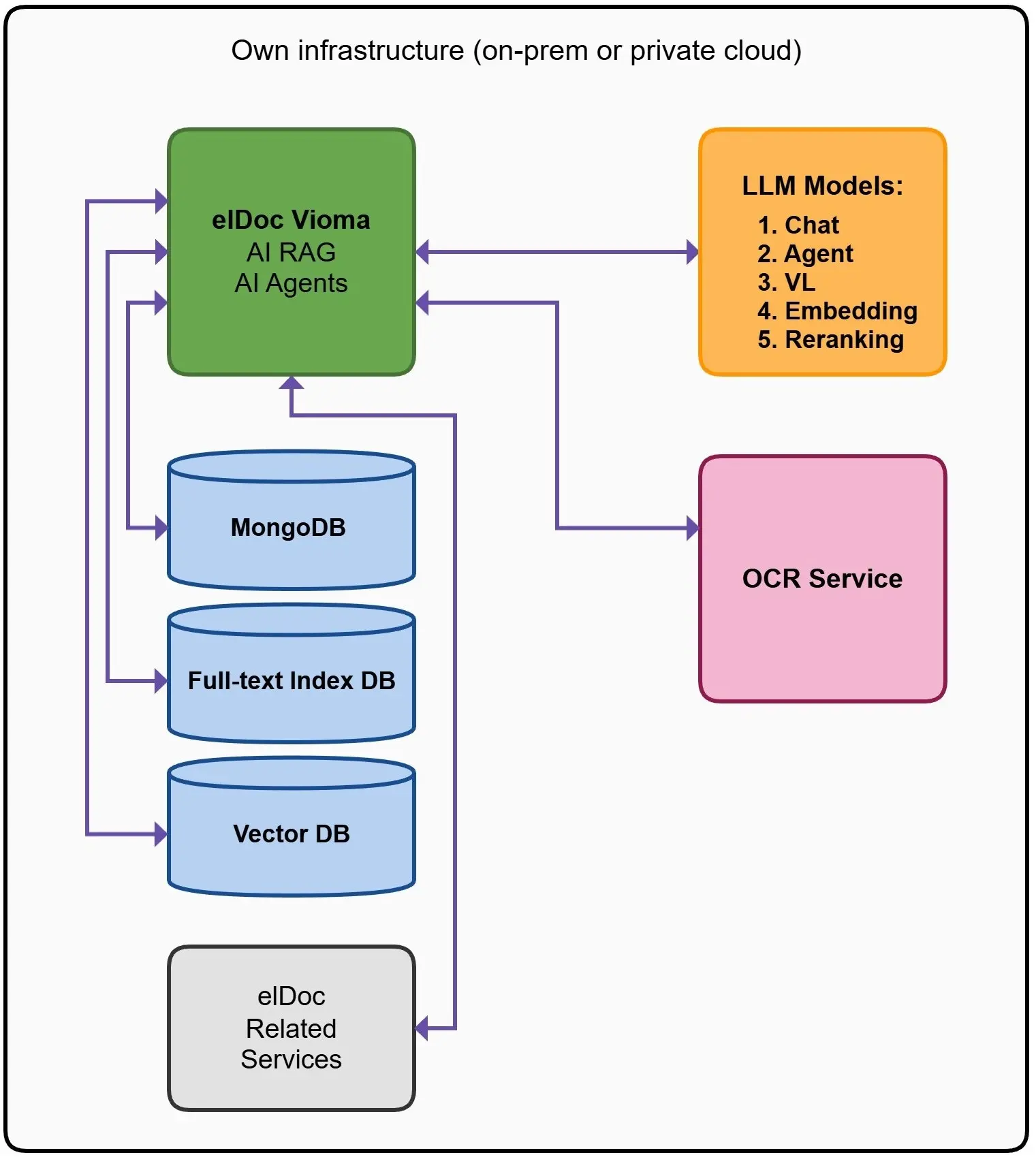
At the center is elDoc, which acts as the AI orchestration layer. It connects enterprise repositories, search technologies, OCR services, databases, and multiple LLMs into one secure environment.
The architecture includes:
- MongoDB for document metadata, business data, configuration, and AI interaction records
- Full-text search for exact words, document numbers, names, clauses, and reference values
- Vector database for semantic search and retrieval of conceptually related content
- OCR services for scanned PDFs, images, and photographed documents
- elDoc related services for document management, security, workflow automation, metadata, and integrations
- Multiple LLM models for chat, AI agents, vision-language processing, embeddings, and reranking
When a document enters elDoc, or when elDoc connects to local repositories it can be automatically OCR-processed, indexed, classified, enriched with metadata, converted into embeddings, and made available for permission-aware Retrieval-Augmented Generation.
elDoc then coordinates the entire process. It identifies the user, checks access rights, retrieves the most relevant information, selects the appropriate model, prepares the context, and returns a grounded response linked to the original enterprise documents.
This architecture is designed to support large document volumes and multiple AI use cases simultaneously. Different models can be assigned to different tasks – for example, one model for internal chat, another for document analysis, a vision-language model for image-based content, and dedicated models for embeddings and reranking.
Without such an architecture, organizations must independently build, integrate, secure, test, and maintain numerous separate components. This can take many months or even years before the environment becomes reliable enough for production use.
With elDoc, these capabilities are already integrated into a unified platform. Organizations can therefore connect local repositories, deploy approved LLMs on-premises or in a private cloud, and begin building secure enterprise AI solutions without creating the entire technology stack from the ground up.
Connecting elDoc to Your Local Repositories and ERP
An LLM can only provide accurate, trusted answers if it has access to the organization’s knowledge. In most enterprises, that knowledge is spread across multiple systems including document repositories, ERP platforms, CRM systems, shared network drives, email archives, and line-of-business applications.
Rather than moving all information into a new location, elDoc securely connects to existing enterprise repositories and continuously builds an intelligent knowledge layer for AI.
Typical information sources include:
- Microsoft SharePoint and file servers
- ERP systems such as SAP, Oracle, Microsoft Dynamics, or other industry-specific platforms
- CRM platforms
- SQL and NoSQL databases
- Network shared folders
- Email repositories
- Business applications and internal systems
- REST APIs and enterprise integration platforms
As information is synchronized, elDoc automatically processes and enriches the content. Documents can be OCR processed, classified, indexed, enriched with metadata, and converted into vector embeddings while preserving their relationship with the original source.
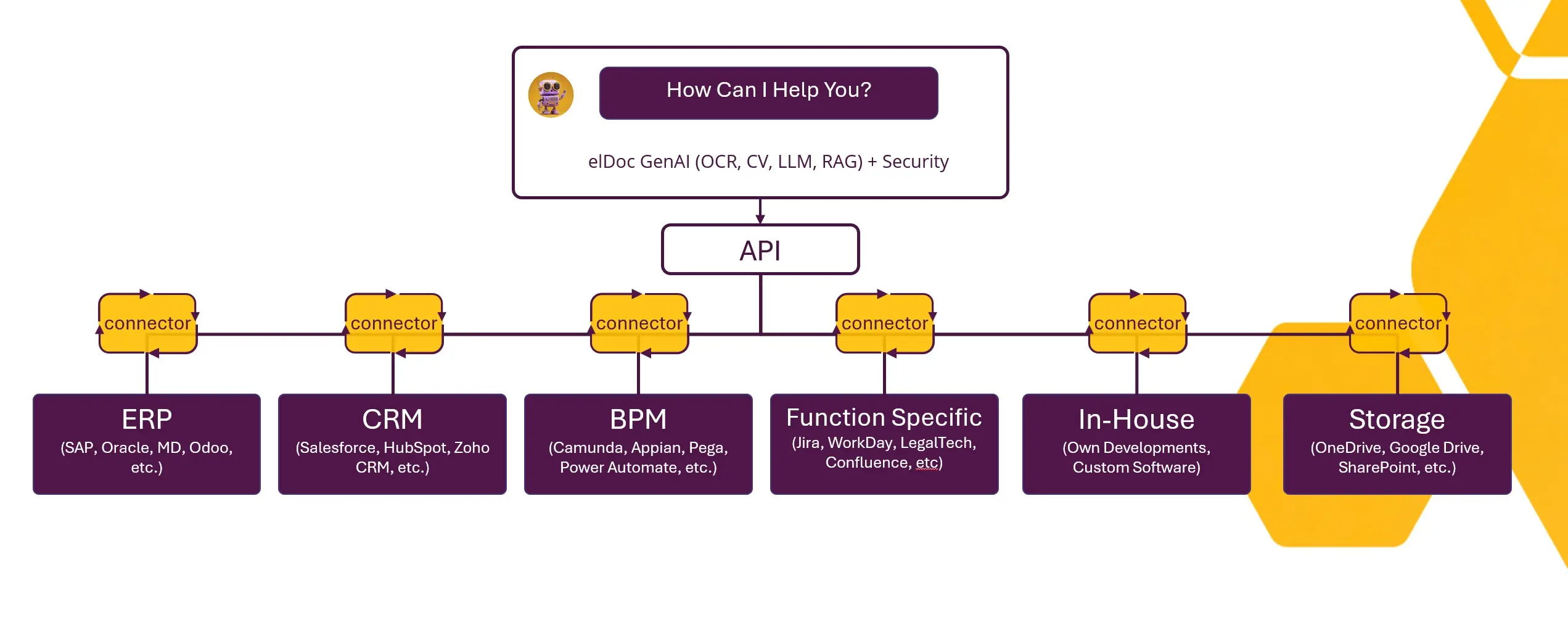
This creates a unified Enterprise Knowledge Base that powers Agentic RAG.
When users or AI Document Agents submit a request, elDoc intelligently retrieves only the relevant information from authorized repositories. It combines traditional full-text search, semantic vector search, metadata filtering, and business context before sending the retrieved information to the selected LLM.
Unlike traditional RAG implementations that simply search documents, Agentic RAG in elDoc can understand relationships between documents, structured business data, and enterprise processes. AI agents can retrieve information from multiple systems simultaneously, compare contracts with ERP records, validate invoices against purchase orders, review customer information from CRM systems, or assemble complete business context before generating a response or executing a workflow.
Because elDoc inherits existing security permissions from connected repositories, users and AI agents only access information they are authorized to view. Every retrieval, AI interaction, and automated action is fully audited, providing complete governance over enterprise knowledge.
By connecting local repositories and business systems into a single AI-ready knowledge layer, elDoc transforms isolated enterprise information into trusted intelligence that powers secure Enterprise Search, AI Document Agents, workflow automation, and next-generation Agentic RAG.
Connect One or Multiple LLMs to Your Enterprise Knowledge with elDoc
Selecting the right Large Language Model is only part of building an Enterprise AI platform. To deliver trusted business value, the LLM must be securely connected to your organization’s documents, business systems, and enterprise knowledge while operating within existing security and governance policies.
Built on an LLM-agnostic architecture, elDoc enables organizations to connect virtually any Large Language Model—whether an open-source model running on-premises, a commercial model hosted in a private cloud, or leading cloud services such as OpenAI, Anthropic, Google Gemini, or Azure OpenAI.
Organizations with strict data sovereignty and regulatory requirements can deploy a fully on-premises AI environment, where the LLM, OCR services, embedding models, vector database, AI orchestration, and enterprise knowledge all remain within their own infrastructure. Sensitive documents, prompts, and AI responses never leave the organization’s controlled environment, making this architecture ideal for government agencies, financial institutions, healthcare providers, and other highly regulated industries.
For organizations seeking greater flexibility, elDoc also supports hybrid AI architectures. Sensitive documents can be processed using locally hosted LLMs, while selected non-confidential tasks can be securely routed to cloud-based models that provide advanced reasoning capabilities. This allows organizations to balance security, performance, and operating costs without compromising control over sensitive enterprise information.
Unlike platforms that rely on a single AI provider, elDoc can orchestrate multiple LLMs simultaneously, assigning each model to the task it performs best. For example, one model may power enterprise chat, another may perform complex reasoning for AI Document Agents, a Vision Language Model (VLM) may process scanned documents and images, while dedicated embedding and reranking models optimize the accuracy of Agentic RAG.
Because the AI orchestration layer is independent of any specific LLM, organizations are free to introduce new models or replace existing ones as AI technology evolves. This eliminates vendor lock-in and ensures the Enterprise AI platform remains future-ready while providing the optimal balance of security, performance, accuracy, and cost.
Go Beyond LLM Installation – Build a Secure Enterprise AI Framework
Installing a Large Language Model is relatively straightforward. Building an Enterprise AI platform that can securely process millions of documents, connect to enterprise repositories, orchestrate AI agents, and scale across the organization is the real challenge.
elDoc provides this foundation out of the box.
With integrated document management, intelligent document processing, Agentic RAG, AI Document Agents, enterprise search, workflow automation, and an LLM-agnostic architecture, elDoc enables organizations to deploy Generative AI with confidence—whether fully on-premises, in a private cloud, or through a hybrid architecture.
Instead of spending months or years integrating dozens of technologies, organizations can focus on delivering business value while maintaining complete control over security, governance, and data sovereignty.
Ready to Build Enterprise AI at Scale? Discover how elDoc can help your organization securely connect enterprise knowledge, deploy one or multiple LLMs, and build a future-ready AI platform designed for real business operations.