
AI-Powered Application Form Processing with OCR, Data Extraction and Secure Storage

Application forms remain at the heart of many business processes—from customer onboarding and insurance applications to public-sector services, financial requests, registrations, claims and internal approvals. Yet processing these forms manually is time-consuming, error-prone and difficult to scale.
With elDoc Intelligent Document Processing, organizations can transform incoming application forms into structured, validated business data and automatically route them into the appropriate workflow and document repository.
From Application Form to Business-Ready Data
Application forms are rarely processed as standalone documents. In most business processes, the application is only the starting point of a larger document package containing identification documents, certificates, statements, evidence, supporting records and correspondence. The organization must not only read the application form, but also understand what has been submitted, which documents belong to the same application, what information they contain, whether the required information is complete, and what should happen next.
Applications may arrive through web portals, email, APIs, integrations or scanned paper documents, in formats such as PDF, JPG, PNG and TIFF. elDoc provides an end-to-end application processing approach, bringing OCR, LLM-powered document understanding, AI classification, data extraction, validation, workflow initiation and secure document storage into one connected process.
Application Forms Across Different Business Processes
The supporting documents can vary significantly depending on the type of application:
| Application Process | Application Form May Come With | What Needs to Be Processed |
|---|---|---|
| Utility Service Connection | ID, proof of address, property ownership or tenancy documents, site plans, authorization letters, technical documentation | Identify the applicant and service location, extract connection details, classify supporting documents, verify completeness and initiate the appropriate connection workflow |
| Insurance Claim | Insurance policy, photographs, invoices, receipts, medical documents, police reports, repair quotations and other evidence | Capture claim information, identify submitted evidence, extract amounts and relevant details, connect supporting documents to the claim and route the case for assessment |
| Banking / Loan Application | ID, proof of address, bank statements, salary records, employment certificates, company documents and financial statements | Extract applicant and financial information, classify supporting records, validate required data and prepare the application package for review and approval |
| Government / Public-Service Application | ID, certificates, declarations, licenses, permits, official records and supporting evidence | Recognize different document types, capture application data, check required documentation and route the case through the relevant administrative process |
| Property / Tenancy Application | ID, proof of income, employment records, references, property documents, tenancy records and certificates | Extract applicant and property information, organize supporting documents, identify relevant dates and data, and route the application for verification and approval |
This means that application processing is not simply about running OCR on a form. The complete document package must be converted into information that employees and downstream business systems can actually use.
From Multiple Documents to One Connected Application Case
With elDoc, an incoming application and its supporting documents can be processed as one connected business case.
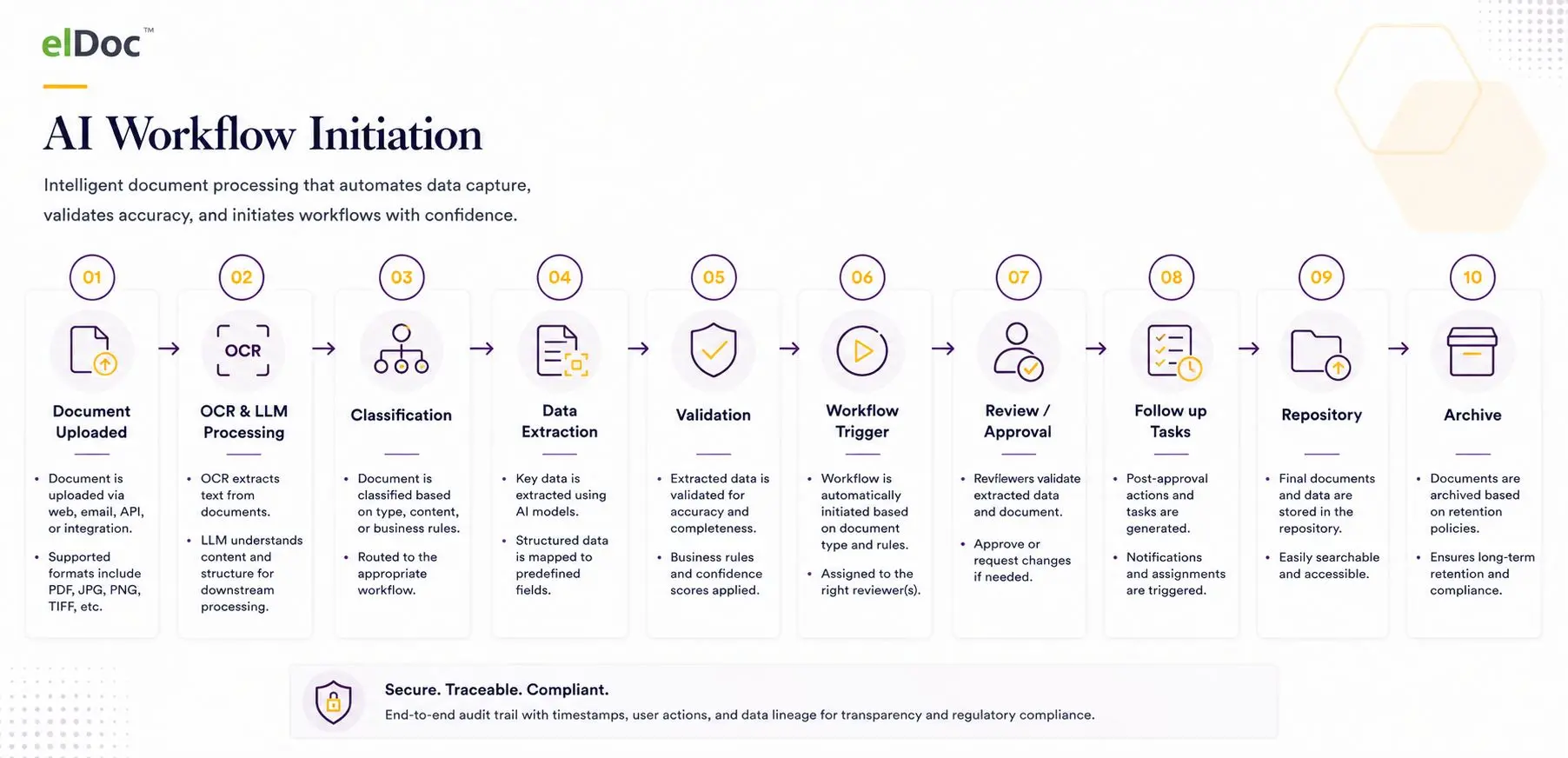
Application Form + Supporting Documents → OCR & LLM Processing → AI Classification → Data Extraction → Validation & Completeness Checks → Workflow Initiation → Review / Approval → Secure Repository → Archive
At each stage, the document package becomes progressively more structured:
OCR & LLM Processing converts scanned and digital documents into machine-readable information and enables AI to understand their content and context.
AI Classification identifies whether an incoming document is an application form, identity document, invoice, certificate, statement, supporting evidence or another document type and associates it with the appropriate processing path.
AI Data Extraction captures the information required for the business process—from applicant names, addresses and reference numbers to dates, amounts, account information and application-specific fields—and maps it into structured data.
Validation & Completeness Checks help determine whether extracted information meets defined confidence and business rules and whether the expected documents and information have been received. Cases requiring verification can be routed for Human-in-the-Loop (HITL) review.
Workflow Initiation turns the processed application into an actionable business process. Based on document type, extracted information and configured rules, elDoc can initiate the relevant workflow, assign reviewers and generate follow-up activities.
Secure Storage & Archive keeps the original application, supporting documents, extracted metadata and processing information connected and searchable throughout their lifecycle.
1. Capture Application Forms from Any Channel
Application forms can enter the organization through multiple channels. They can be uploaded through a web portal, received by email, transferred through an API, scanned from paper or submitted from another enterprise system.
elDoc supports common business document formats including PDF, JPG, PNG and TIFF, enabling organizations to process both digitally generated forms and scanned documents within the same environment.
Organizations can also choose to provide applicants with a single, dedicated submission interface, creating a more structured and self-guided application process. Instead of simply providing a generic file-upload function, the portal can guide applicants through the required submission steps—for example, selecting an application type, providing basic information and uploading the application form together with the required supporting documents.
The submission process can incorporate verification and completeness checks before the application is accepted. Depending on the use case, applicants can be prompted when mandatory information or documents are missing, helping reduce incomplete submissions and subsequent back-and-forth communication.
For example, an applicant submitting a utility connection request could be guided to provide the application form, identification document, proof of address and relevant property documentation before completing the submission. The same approach can be adapted to insurance claims, loan applications, government services or other document-intensive processes.
This provides organizations with two complementary approaches: process applications from existing channels without changing how customers currently submit documents, or introduce a centralized, self-guided application portal that standardizes the submission process from the very beginning.
In both cases, documents enter the same downstream processing flow:
Submission → Initial Verification → OCR & AI Processing → Classification → Data Extraction → Validation → Workflow
This creates a centralized and controlled entry point for application processing, while giving organizations flexibility in how applicants, customers, partners and employees interact with the process
2. Automatically Classify Applications and Supporting Documents
An application rarely arrives alone. It may be accompanied by identification documents, certificates, financial statements, contracts, supporting evidence and other attachments. elDoc provides out-of-the-box AI-powered document classification to automatically recognize these documents and assign them to the appropriate document types for further processing.
However, document classification can go significantly beyond simply recognizing that a document is, for example, a Real Estate Agreement.
Organizations may need to classify documents according to their own internal business context, document content, codes, terminology or operational rules. elDoc allows clients to provide additional AI prompts and contextual instructions describing exactly how documents should be classified.
For example, a client may define:
| Application / Document | Additional Context / Instruction Given to AI | Resulting Classification |
|---|---|---|
| Utility Service Application | If Service Code = NC01, classify as New Connection. If Service Code = AC02, classify as Account Change. | New Connection Application / Account Change Application |
| Insurance Claim Form | If the claim includes Policy Product Code MV, classify under Motor Claims; if Product Code TR, classify under Travel Claims. | Motor Insurance Claim / Travel Insurance Claim |
| Banking / Loan Application | Applications from companies with annual turnover below the defined threshold should be classified as SME; all others as Corporate. | SME Financing Application / Corporate Financing Application |
| Government Service Application | If Applicant Type = GOV, route to Government; if Applicant Type = COM, classify as Commercial, regardless of the general application form type. | Government Application / Commercial Application |
| Real Estate Agreement | The document may look identical, but Property Code 005 means Government Property and Code 002 means Commercial Property. | Government Real Estate Agreement / Commercial Real Estate Agreement |
This enables multi-level, business-specific classification. AI can first understand what the document is and then use its content and the organization’s instructions to determine how that document should be classified within the actual business process.
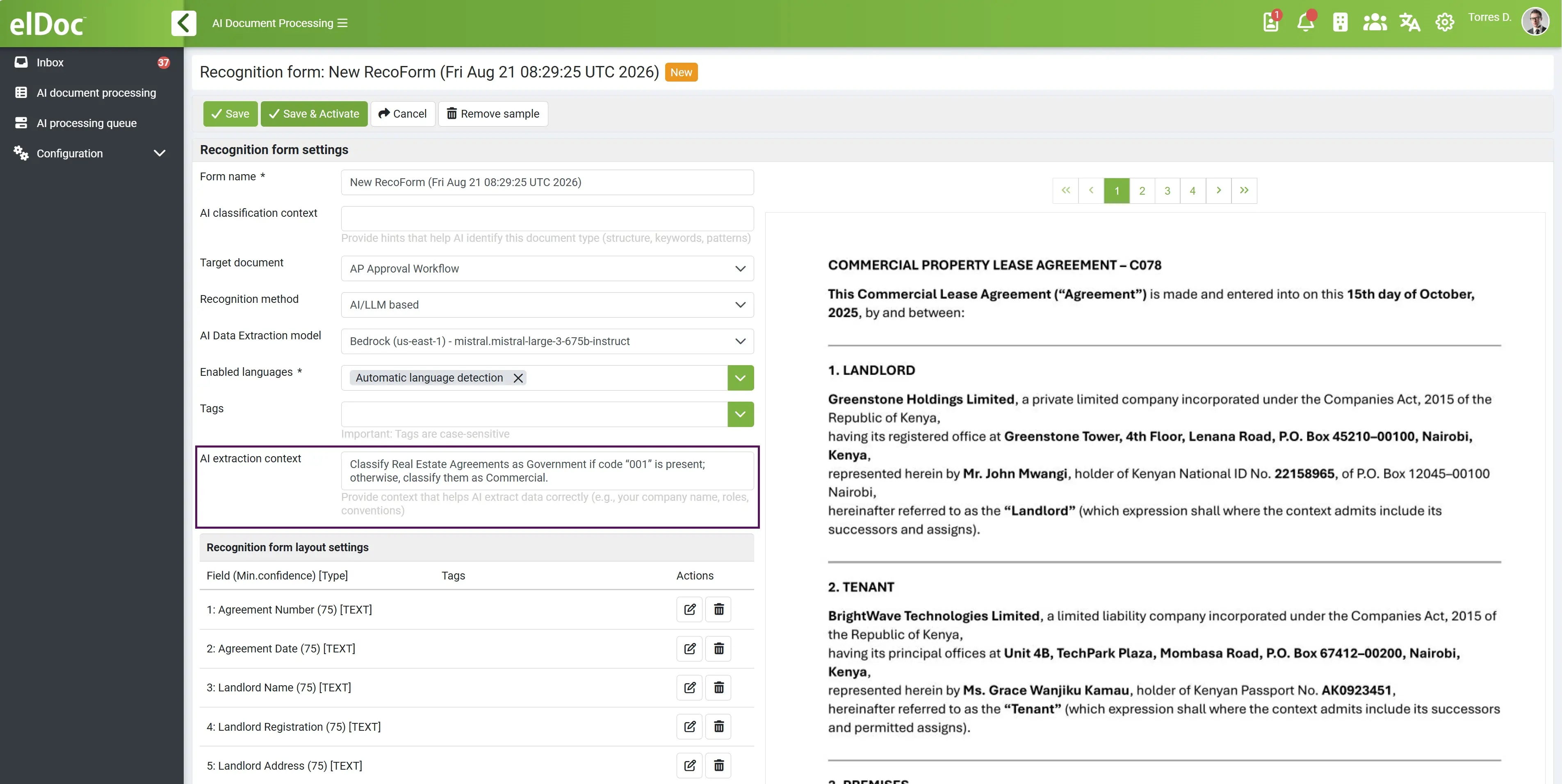
Importantly, these instructions can be configured using natural-language AI prompts and context, reducing the need to develop complex hard-coded classification logic for every business scenario.
Once the classification is established, it can determine what happens next:
Document Received → AI Identifies Document Type → Business-Specific AI Classification → Appropriate Data Extraction → Validation → Workflow Routing
For application processing, this means elDoc can determine not only what documents have been submitted, but also which business category they belong to and which processing path should follow. This provides a flexible foundation for automatically applying the correct extraction requirements, validation rules, workflows, responsible teams and storage structure.
3. OCR and AI-Powered Document Understanding & Data Extraction
Once an application is received, OCR converts scanned or image-based documents into machine-readable text. This provides the foundation for further automated processing.
However, OCR alone primarily recognizes characters and text. elDoc combines OCR with AI and LLM-powered document understanding to interpret the structure, context and meaning of the information contained within a document. This enables organizations to process forms with different layouts and structures without relying exclusively on rigid templates or fixed field coordinates.
Define Exactly What Data Should Be Captured
For each document type, organizations can define which fields should be extracted. Different document types can therefore have their own data extraction requirements.
For example:
| Document Type | Examples of Fields to Capture |
|---|---|
| Utility Connection Application | Applicant Name, Service Address, Meter Number, Connection Type, Requested Connection Date |
| Insurance Claim Form | Policy Number, Claimant Name, Incident Date, Claim Type, Claimed Amount |
| Loan Application | Applicant Name, Company Name, Requested Amount, Loan Purpose, Annual Income |
| Government Application | Applicant Name, Application Type, Reference Number, Submission Date, Licence/Permit Type |
| Property / Tenancy Application | Tenant Name, Property Address, Monthly Rent, Lease Start Date, Lease End Date |
Give AI Context for How Each Field Should Be Understood
More importantly, organizations can provide AI prompts and contextual instructions at the individual field level.
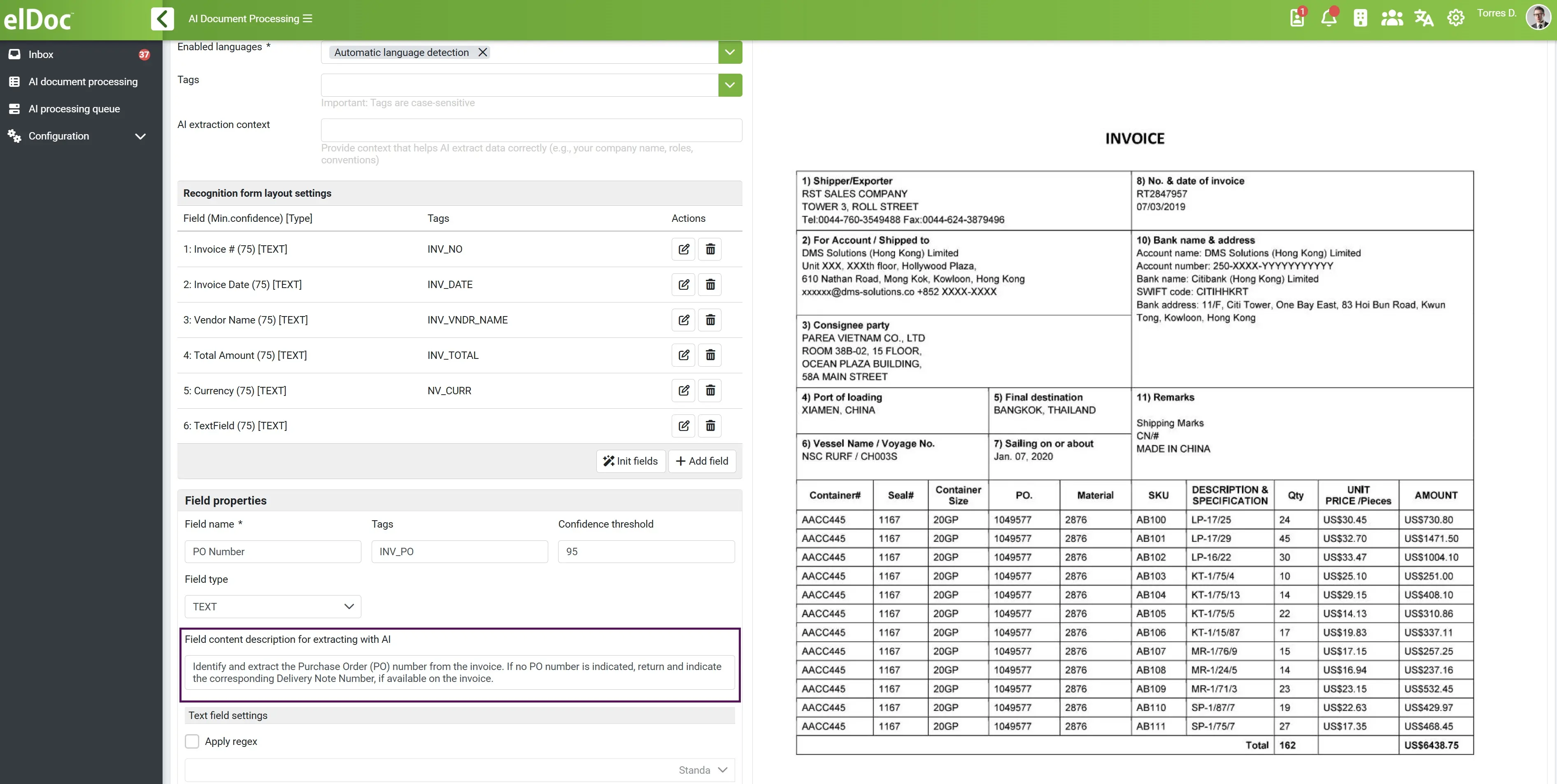
This is particularly useful because the same word, number or phrase can have a different business meaning depending on the document, process or organization’s terminology. Rather than simply asking AI to find a value with a particular label, the client can explain what the field means, where it may appear, how it should be interpreted and which value should be selected when several possible values are present.
For example:
| Field | Example AI Context / Instruction |
|---|---|
| Applicant Name | Capture the legal name of the party applying for the service. Do not use the name of the authorized representative or contact person. |
| Claim Amount | Capture the total amount being claimed by the policyholder, not the repair estimate, deductible or policy coverage limit. |
| Effective Date | Capture the date on which the agreement becomes legally effective, not the document signing or submission date. |
| Property Address | Capture the address of the property covered by this application, not the applicant’s correspondence or registered address. |
| Customer Reference | Use the organization’s customer reference number. Do not return the application number, invoice number or external reference. |
This additional context helps AI distinguish between multiple values that may all appear technically correct in the document but have different business meanings.
For example, an insurance claim package may contain a claimed amount, repair quotation, policy limit and deductible. OCR can recognize all four numbers, but the field-level AI instruction tells the model which amount the organization actually wants to capture as the “Claim Amount.”
From Document Text to Business-Ready Data
This approach combines three important capabilities:
OCR recognizes the content → AI understands the document → Client-defined prompts explain what specific business information should be captured.
The extracted information is then transformed into structured fields and metadata that can be validated, searched, used to initiate workflows, stored with the document or transferred through APIs to downstream ERP, CRM, core business and other enterprise systems.
As a result, data extraction becomes document-specific, context-aware and configurable to the organization’s own business terminology and requirements, rather than being limited to predefined OCR fields or fixed document templates.
4. Check Application Completeness and Supporting Documents
Before an application moves into validation or approval, elDoc can help determine whether the complete application package has been received.
Because the application form and supporting documents have already been classified, the platform can apply document-specific requirements to identify which documents are expected for a particular application type. The required document set can also vary according to information found within the application.
For example, a Utility Connection Application may require proof of identity and proof of address, while an application submitted by a tenant may additionally require a tenancy agreement or property-owner authorization. An Insurance Claim may require different supporting evidence depending on whether it is a motor, travel, medical or property claim.
The process can therefore check:
- whether all mandatory documents have been submitted;
- whether mandatory application fields and information are available;
- whether the submitted documents correspond to the expected document types;
- whether additional documents are required based on the application content;
- whether a case should continue automatically or be routed for further review.
This enables organizations to identify incomplete applications before they enter lengthy review and approval processes, reducing manual checking and unnecessary communication between applicants and processing teams.
5. Validate Before Triggering the Workflow
Automating extraction should not mean blindly trusting every AI-generated value. Before extracted information is used to initiate workflows, update business systems or support a decision, organizations can introduce multiple layers of validation and control.
elDoc can apply AI confidence scoring, configurable validation rules and Human-in-the-Loop (HITL) verification to extracted information.
Validation can be performed at the individual field level. For example, an organization may decide that a policy number, applicant ID or bank account number must meet a particular format; an application date must fall within an acceptable range; or a claimed amount above a defined threshold requires additional review.
AI confidence can provide another layer of control. Where the confidence level of an extracted value falls below the organization’s defined threshold, the field can be automatically presented to an authorized employee for verification.
Validation Determines the Next Step
| Validation Result | Processing Path |
|---|---|
| High AI confidence + validation passed | → Continue automatically to the next workflow step |
| Low AI confidence | → Route selected fields for Human-in-the-Loop verification |
| Validation rule failed | → Create an exception for review or correction |
| Critical business field | → Require mandatory human verification, regardless of confidence |
| Missing required information | → Place application on hold or request additional information |
Automation where confidence and rules allow it. Human verification where business controls require it.
This creates a controlled balance between straight-through processing and Human-in-the-Loop review, allowing organizations to automate routine applications while maintaining additional control over exceptions and business-critical information.
6. Automatically Initiate the Application Workflow
Once the application has been classified, required documents identified, data extracted and validation completed, elDoc can automatically initiate the appropriate application workflow.
The workflow does not need to be identical for every application. It can be selected dynamically according to the application type, document classification, extracted data, validation results or organization-specific business rules.
For example, a standard application meeting all requirements could proceed directly to the responsible processing team, while an application exceeding a certain amount could require an additional level of approval. An incomplete or exceptional application could be routed to a dedicated review queue.
Depending on the process, elDoc workflows can support task assignment, review and approval steps, notifications, escalation, exception handling and integration with external enterprise systems.
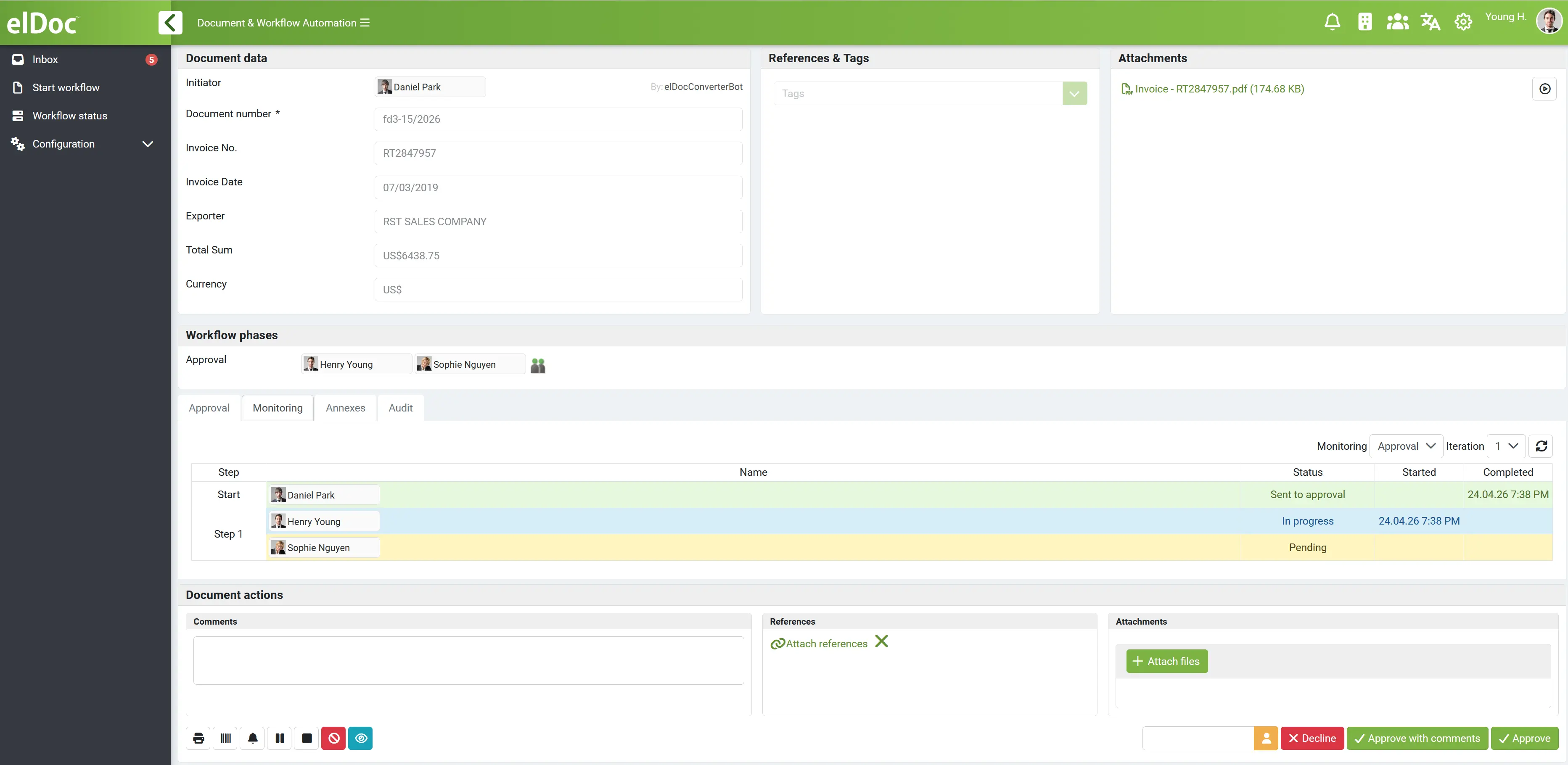
A typical process could look like:
Application Received → Documents Classified → Data Extracted → Completeness Checked → Data Validated → Workflow Selected → Reviewer Assigned → Approval → Storage
Structured information captured from the application can also be transferred to downstream systems through integration, reducing the need for employees to manually re-enter the same information.
This transforms application processing from a standalone OCR and data-capture activity into an operational end-to-end business process.
7. Secure Application Form Storage, Search and AI Search via Agentic RAG
Once processed, the application form and its supporting documents can be securely stored in the elDoc document repository together with their extracted metadata, classifications and relevant processing information.
Rather than retaining only a scanned PDF or a collection of unrelated attachments, organizations can maintain a structured application record connecting the original application, supporting documents and extracted business data within the same application context.
For example, an application record may contain the original application form, identification documents, supporting evidence, applicant information, application/reference number, document classifications, extracted metadata and relevant workflow information.
Traditional Search and Metadata-Based Retrieval
Because extracted fields become searchable metadata, employees can locate applications using actual business information rather than relying only on filenames or folder structures.
Applications can be searched using attributes such as applicant name, customer number, application reference, property address, policy number, document type, submission date, application status or other extracted fields.
This provides a structured way to locate individual applications and supporting documents even when organizations manage very large document volumes.
AI Search Across Applications with Agentic RAG
Beyond traditional search, organizations can use elDoc Agentic RAG to interact with application documents using natural-language questions.
Instead of manually searching for a document, opening multiple attachments and reading through their contents, an authorized employee can ask AI questions across the information available to them.
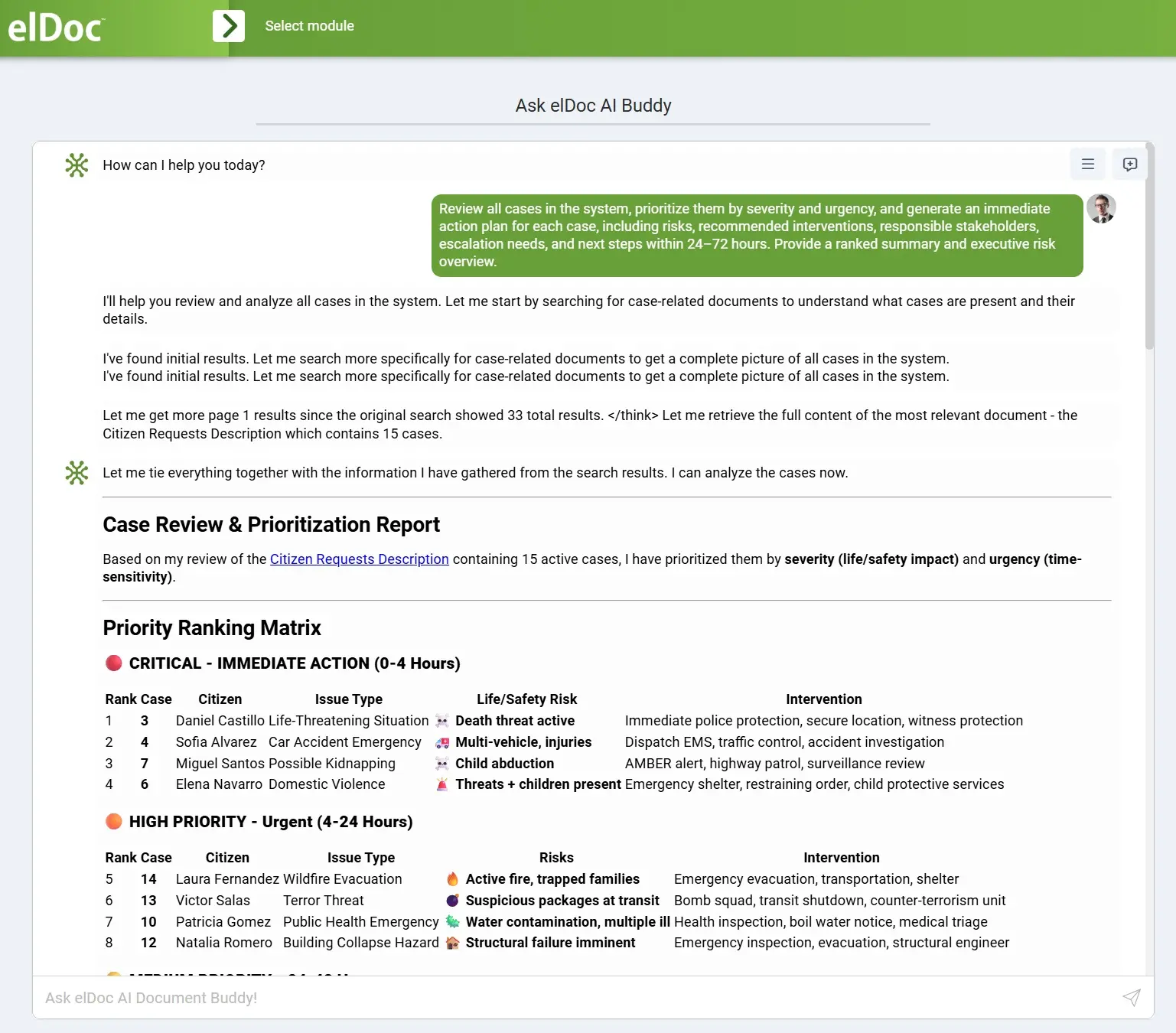
For example:
| User Question | AI Search Can Help Retrieve |
|---|---|
| “Find the application for ABC Company and summarize the request.” | Application and relevant supporting documents, with a concise summary |
| “What connection capacity was requested for this property?” | Relevant information from the utility application and supporting documents |
| “What evidence was submitted for this insurance claim?” | Claim form and associated evidence, such as invoices, reports and photographs |
| “What is the requested loan amount and stated purpose?” | Relevant information extracted from the application and supporting financial documents |
| “What are the key dates and obligations in this property application?” | Relevant dates and terms identified across the application package |
Access-Aware AI Search
Importantly, AI search should not become a new way of bypassing document permissions.
elDoc Agentic RAG can operate within the organization’s configured user, role and document access permissions, so the information available through AI search reflects the information the user is authorized to access.
The user does not gain broader access simply by asking AI a question. Agentic RAG searches and answers within the user’s authorized information scope.
This is particularly important for application processing, where documents can contain personal, financial, contractual or other sensitive information.
By combining secure document storage, structured metadata search and permission-aware Agentic RAG, elDoc turns the repository from a passive archive into an active enterprise knowledge source—allowing authorized users not only to find application records, but also to ask questions and retrieve relevant information from them using natural language.
8. Retention and Long-Term Archive
The application lifecycle does not necessarily end when an application is approved, rejected or otherwise completed. Many organizations need to retain application records and supporting documentation for operational, contractual, regulatory or internal governance purposes.
Once processing is complete, documents can move into controlled retention and long-term archive processes.
Retention requirements can be associated with document types and business requirements, helping organizations manage how completed application records are maintained over time. Importantly, the application does not lose its context when it moves into long-term storage.
The organization can retain the connection between the original application, supporting documents, extracted metadata and relevant processing information, preserving a traceable record of the application lifecycle.
For organizations processing thousands or millions of applications, this provides a structured approach to managing growing document volumes while maintaining searchability, controlled access, traceability and lifecycle management from the moment an application is received through to its final archive.
Ready to Automate Your Application Form Processing?
Every application process is different: the forms, supporting documents, data to be captured, validation requirements and approval workflows depend on the organization and use case.
Talk to an elDoc expert to explore how your existing application process can be transformed—from initial document submission and OCR to AI-powered data extraction, validation, workflow automation, secure storage and Agentic RAG.
Bring us your application forms and processing requirements—we can help you identify where AI and document automation can deliver the greatest value across the application lifecycle.