
Secure AI for Document Archives: Making Enterprise Information Searchable and Actionable

Most organizations already possess enormous amounts of valuable information. The problem is not that the information does not exist – it is that much of it remains silent.
Contracts, application forms, correspondence, reports, invoices, case files, technical documentation and historical records may be stored across physical archives, scanned PDFs, shared drives and legacy repositories. Employees know that information exists somewhere, but finding the right document or the right information inside thousands or millions of documents – can still require significant manual effort.
Generative AI creates an opportunity to change this.
With elDoc, organizations can transform traditional document archives into secure, searchable and actionable enterprise knowledge, combining document digitization, Intelligent Document Processing (IDP), AI-powered search, Agentic RAG and enterprise security controls.
Where to Start: Your Archive May Already Contain the Knowledge You Need
Your organization may have thousands or millions of documents locked in archive rooms, storage facilities, filing cabinets or secure vaults.
Those documents may be old, but the information inside them can still be highly valuable: contracts, customer records, property documents, policies, technical files, correspondence, historical transactions and institutional knowledge accumulated over many years.
The challenge is turning that archive into usable digital information.
A traditional digitization project can become enormous if every document must be manually scanned, reviewed, named, sorted, indexed, assigned metadata, placed into the correct folder and given appropriate access permissions.
With large archives, doing this manually could take months or years.
elDoc AI changes the approach.
Scan First. Let elDoc Help Organize the Archive
Organizations do not necessarily need a specialized scanning environment to start.
elDoc can work as part of a document capture process using different scanners and multifunction devices. Documents can be scanned and sent directly into elDoc according to the organization’s configured capture and processing rules.
From there, elDoc AI-powered processing can automate much of the repetitive work required to transform a physical archive into secure, searchable enterprise knowledge.
| Stage | What Happens with elDoc | Result |
|---|---|---|
| 1. Capture | Scan paper documents using your existing scanner or multifunction device and send them to elDoc. Existing digital documents can also be imported. | Paper and legacy files enter a unified digital process. |
| 2. Recognize | OCR converts scanned documents into machine-readable content. | Information previously locked inside scanned pages becomes processable. |
| 3. Classify | AI identifies document types such as contracts, applications, invoices, correspondence or other business records. | Documents no longer need to be manually sorted one by one. |
| 4. Extract | AI extracts relevant business data and metadata according to the document type. | Names, dates, references, values and other important information become structured data. |
| 5. Index & Organize | Extracted metadata and classification results can drive indexing, naming and repository organization. | Documents become easier to locate without relying only on filenames and folders. |
| 6. Secure | Documents are stored within the governed repository and access is controlled through configured users, roles and permissions. | Sensitive archive information remains available only according to authorized access. |
| 7. Search & Ask | Authorized users can search using business metadata and work with relevant document knowledge through Agentic RAG. | The archive becomes searchable through both structured information and natural-language questions. |
| 8. Act | Extracted information can support workflows, reviews, notifications and other controlled business processes. | The archive evolves from passive storage into actionable enterprise knowledge. |
The transformation can be summarized in one simple journey:
CAPTURE → RECOGNIZE → CLASSIFY → EXTRACT → ORGANIZE → SECURE → ASK → ACT
1. Capture & Understand — Turn Paper into AI-Readable Information
The first step is not simply scanning documents. It is making the information inside them digitally readable and ready for AI processing.
Organizations can use existing scanners or multifunction devices to digitize paper records and send documents into elDoc. Existing PDFs, images and other digital documents can also be brought into the same processing environment.
OCR (Optical Character Recognition) converts scanned pages and document images into machine-readable text. This creates the foundation for the next stage: allowing AI to analyze what the document contains.
This distinction is important:
Scanning creates a digital copy. OCR makes it readable. AI makes it understandable.
Instead of creating another archive containing thousands of image-based PDFs, organizations can begin converting historical documents into information that can be classified, extracted, indexed, searched and used by AI.

That distinction turns archive digitization from a simple paper-to-PDF exercise into the foundation for an AI-powered enterprise knowledge repository.
2. Classify — Let AI Understand What Each Document Is
After documents become machine-readable, the next challenge is determining what they actually are.
In a large archive, documents may include contracts, invoices, applications, policies, certificates, customer correspondence, reports, property records and many other document types.
Manually reviewing and sorting thousands of documents can require enormous effort.
With AI Document Classification, elDoc can analyze document content and classify documents according to configured business categories.
For example:
“This is a Supplier Agreement.”
“This is an Insurance Policy.”
“This is Customer Correspondence.”
“This is a Property Inspection Report.”
Classification can then determine how the document should be processed, what information should be extracted and where it should be organized.
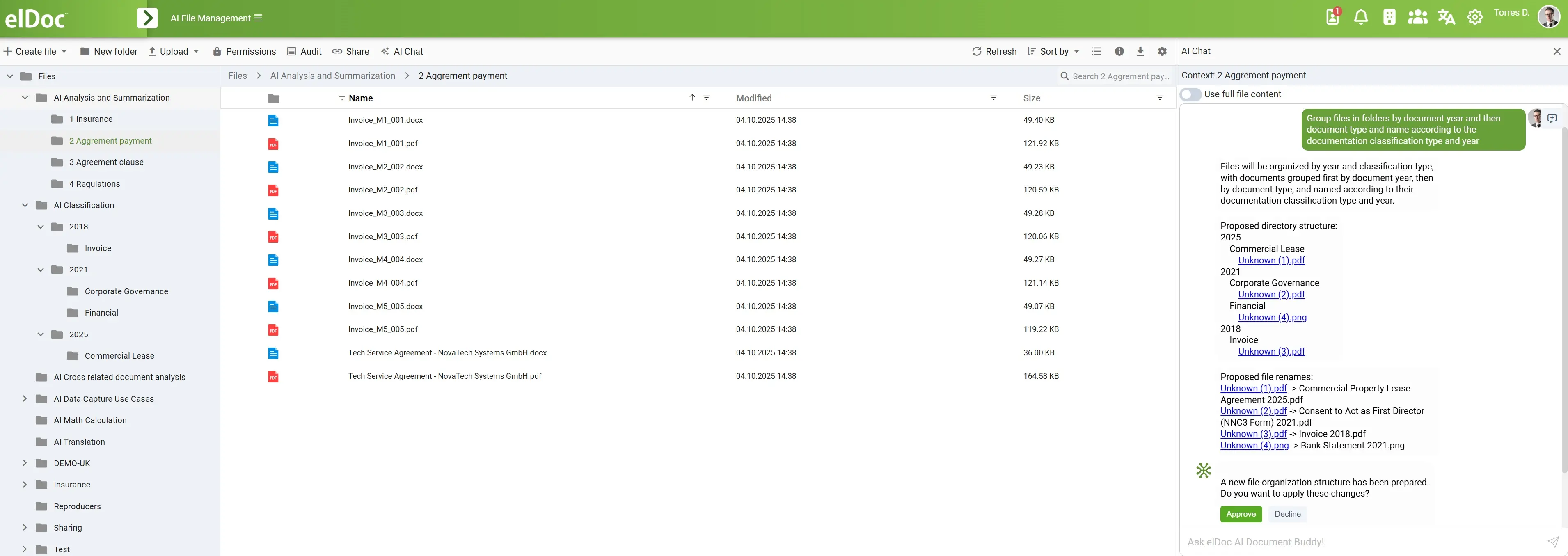
AI therefore begins replacing one of the most repetitive parts of archive digitization: opening, identifying and sorting documents one by one.
3. Extract & AI Index — Turn Documents into Searchable Business Information
Once elDoc understands what a document is, the next step is identifying the business information inside it and using that information to automatically index the document.
Different document types require different indexing information. Instead of employees opening every document and manually entering metadata, elDoc can use AI to extract relevant values and associate them with the original document.
For example:
| Document Type | AI Can Extract | AI Indexing & Search |
|---|---|---|
| Contract / Agreement | Parties, contract number, effective date, expiry date, value, notice period | Search by supplier, contract number, expiry date or agreement type |
| Insurance Policy | Policy number, policyholder, insured entity, policy type, coverage dates | Search by policy number, customer, policy type or coverage period |
| Property / Lease Document | Property address, tenant, lease number, commencement and expiry dates | Search by property, tenant, lease reference or expiration date |
| Customer Application | Applicant name, customer number, application reference, submission date | Search by applicant, customer ID, application number or date |
| Invoice | Supplier, invoice number, invoice date, amount, PO reference | Search by supplier, invoice number, amount, date or PO |
| Correspondence | Sender, recipient, date, customer/case reference, subject | Search by customer, case, sender, date or correspondence type |
The process can be summarized as:
Document → AI Extraction → Structured Metadata → AI Indexing → Searchable Business Information
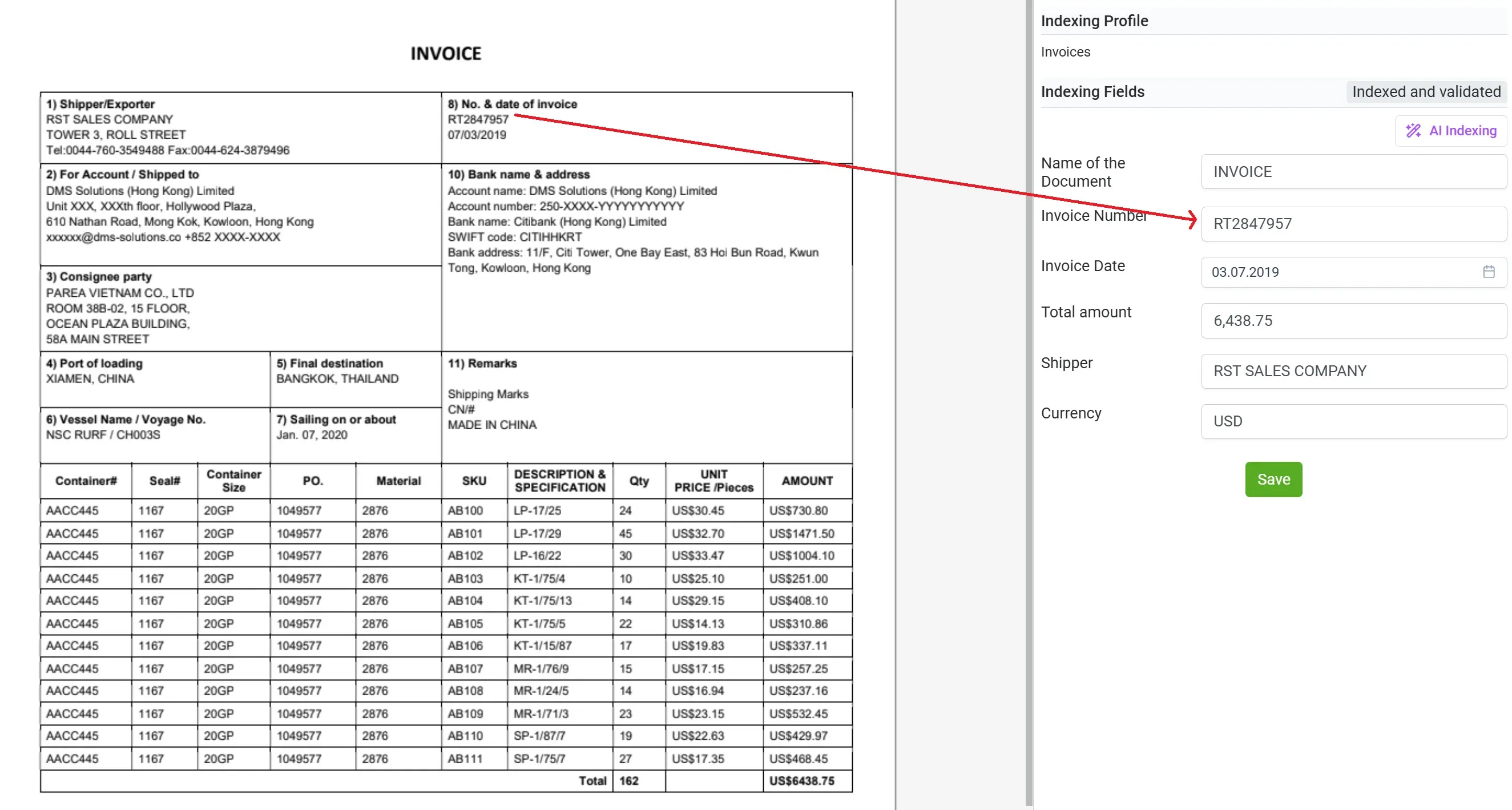
From a PDF to an Indexed Business Record
Consider a scanned supplier agreement. Instead of storing it simply as:
SCAN_00043827.pdf
elDoc can enrich the document with structured metadata:
| Index Field | AI-Extracted Value |
|---|---|
| Document Type | Supplier Agreement |
| Supplier | ABC Limited |
| Contract Number | CT-2026-0184 |
| Effective Date | 1 January 2026 |
| Expiry Date | 31 December 2028 |
| Contract Value | $850,000 |
| Notice Period | 90 Days |
The original document remains available, but it is no longer just an isolated PDF. It now carries structured business context that can be used for indexing, search, filtering and downstream processing.
AI Indexing Changes How Employees Find Documents
Traditional archives often require users to know a filename, folder, document number or physical location.
With AI indexing, users can search using the business information contained inside the documents themselves.
Instead of:
“Find SCAN_00043827.pdf.”
employees can search for:
“Supplier agreements with ABC Limited.”
“Contracts expiring in 2028.”
“Agreements with a value above $500,000.”
“Documents related to property 18 Queen’s Road.”
“All records associated with customer C-10582.”
This is a fundamental shift:
| Traditional Indexing | AI Indexing with elDoc |
|---|---|
| Metadata entered manually | AI extracts relevant metadata from document content |
| Indexing requires document-by-document work | Large document volumes can be processed automatically |
| Search depends heavily on filenames and folders | Search can use actual business attributes |
| Limited metadata | Multiple relevant fields can enrich each document |
| Information remains inside the document | Important information becomes structured and searchable |
| Archive organized around files | Archive becomes organized around business information |
AI indexing is therefore much more than automatically filing a document. It transforms information previously locked inside document pages into a structured, searchable layer of enterprise knowledge.
And once that structured information is combined with the full document content, the archive becomes ready for secure search, Agentic RAG and AI-powered knowledge discovery.
4. Organize & Populate — Build a Structured Archive for Better Search
Once documents have been classified and relevant information extracted, elDoc can use this information to organize the archive and populate document metadata automatically.

Instead of creating a large digital repository filled with scanned PDFs, each document can be placed into the appropriate structure and enriched with meaningful business information.
For example:
| AI Understands | elDoc Can Organize & Populate |
|---|---|
| Document Type | Place the document into the appropriate document category or repository structure |
| Customer / Supplier | Populate customer or supplier metadata |
| Contract / Policy Number | Create searchable reference information |
| Property Address | Associate documents with the relevant property |
| Effective / Expiry Date | Populate searchable date fields |
| Case / Application Number | Connect documents to the relevant business record |
| Document Date | Support chronological search and filtering |
| Other Extracted Information | Populate organization-specific metadata fields |
This creates a much richer archive structure:
AI Classification → Data Extraction → Metadata Population → Document Organization → Searchable Repository
Search by What You Know — Not Where the File Is Stored
Employees no longer need to remember which folder contains a document, what somebody named the file, or when it was scanned.
They can search using the business information they actually know.
For example:
“Find all contracts for ABC Limited.”
“Show property documents for 18 Queen’s Road.”
“Find policies expiring next quarter.”
“Show all documents associated with customer C-10582.”
“Find supplier agreements signed between 2024 and 2026.”
“Show contracts with a value above $500,000.”
The result is a fundamental change in how the archive is organized and accessed:
| Traditional Digital Archive | AI-Organized Archive |
|---|---|
| Files placed into folders | Documents organized by business context |
| Generic scanned filenames | Meaningful document information |
| Metadata entered manually | Metadata automatically populated from extracted data |
| Search by filename | Search by business attributes |
| Users need to know where to look | Users search using what they know |
| PDFs remain isolated records | Documents become connected to structured enterprise information |
The archive is no longer simply digitally stored. It becomes structured around the information employees actually use to find and work with documents.
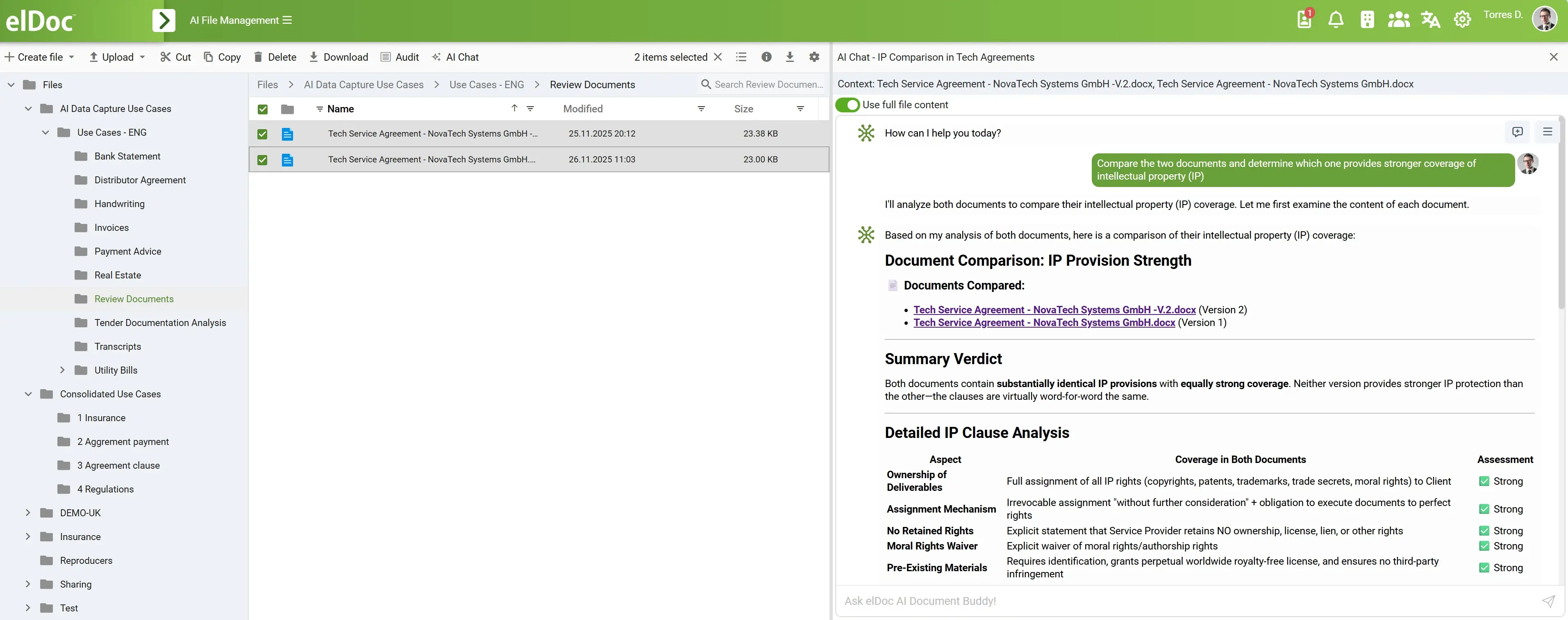
And once documents are organized and metadata is populated, this structured information can provide an even stronger foundation for secure enterprise search and Agentic RAG.
5. Ask — Permission-Aware AI Across the Documents You Choose
Once documents are digitized, classified, indexed, organized and securely stored, authorized users can start interacting with their content through elDoc Agentic RAG.
Importantly, AI does not need unrestricted access to the entire document archive.
Users can ask questions against one document, a selected group of documents, a specific document collection, or a broader repository they are authorized to access.
Permission-Aware by Design
The ability to ask questions should not bypass the security model of the document archive.
With permission-aware access, Agentic RAG can operate within the information boundaries available to the user. If a user is not authorized to access particular documents, those documents should not become accessible simply because the user asks an AI question.
The principle is straightforward:
User → Access Permissions → Selected / Authorized Documents → Agentic RAG → Answer
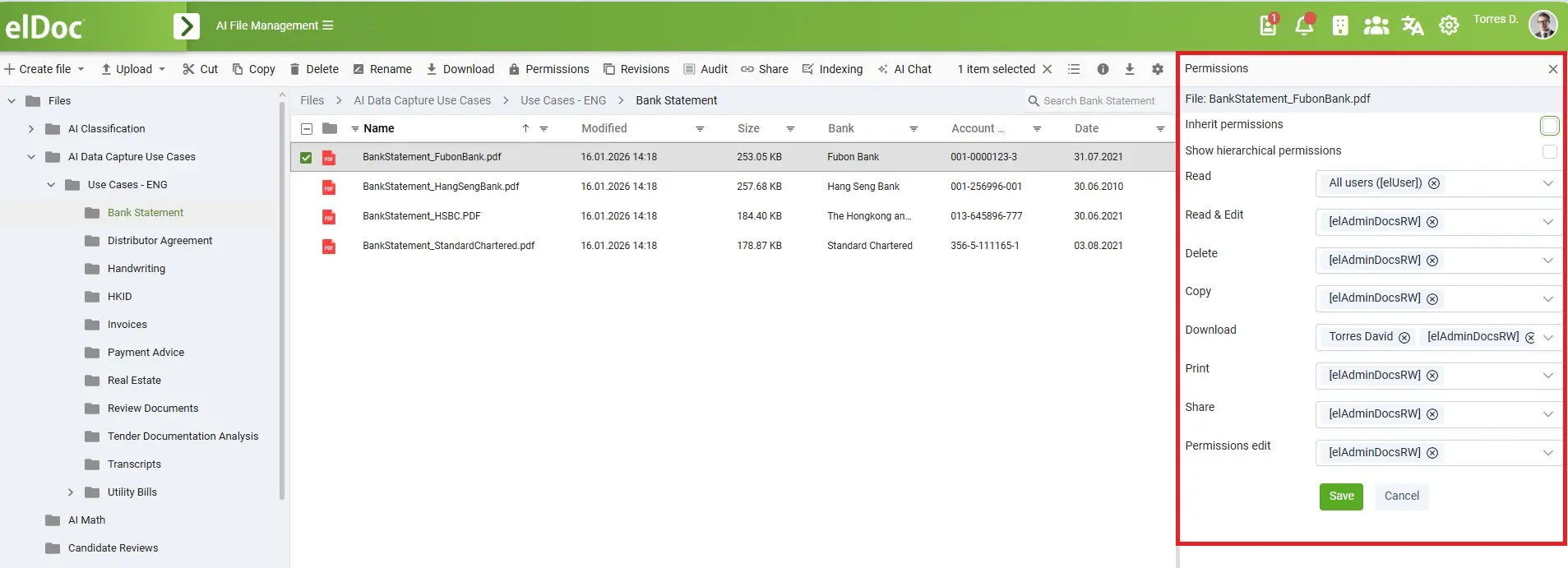
This gives organizations control over both what users can ask AI about and which enterprise information can be retrieved to generate the response.
Employees can therefore move naturally between traditional document management and Generative AI:
Find a document → Select it → Ask questions
Select several documents → Compare them with AI
Search the archive → Select relevant results → Ask across them
Access an authorized knowledge scope → Ask across permitted enterprise information
The result is not an AI assistant with unrestricted access to the archive. It is secure, permission-aware AI access to enterprise knowledge—at the document scope the user chooses and within the access rights the organization has defined.
Your archive is no longer silent. Authorized users can securely ask the documents they need.
From Silent Documents to Active Enterprise Knowledge
The real value of AI-powered archive modernization is not simply that documents become digital. It is that information that was previously difficult to discover can become part of everyday business operations.
Documents that may have remained untouched for years can become searchable by their actual business content. Employees can locate information without knowing filenames or folder structures, ask questions across selected documents with Agentic RAG, and work with historical knowledge that was previously time-consuming to access.
At the same time, making information easier to use should not mean losing control over it. Permission-aware access, governed document storage and controlled AI retrieval allow organizations to unlock archive knowledge while maintaining the security boundaries required for sensitive enterprise information.
The result is a fundamental shift:
Your archive stops being only a place where information is kept and becomes a secure source of enterprise knowledge that people can actually use.