
AI Starts with OCR: The Missing Foundation of Document AI
Enterprise document management is changing quickly.
Organizations are adding RAG, AI search, AI document agents, intelligent extraction, and generative AI to repositories containing millions of documents.
The ambition is clear: instead of simply storing documents, organizations want to ask questions, extract information, identify risks, compare records, and automate work with AI.
But there is a fundamental problem that is surprisingly easy to overlook.
AI cannot reliably work with information it cannot read.
A significant part of enterprise information still arrives as scanned PDFs, images, photographed documents, historical records, application forms, certificates, statements, and other image-based content.
A PDF may look perfectly readable to a person while containing little or no machine-readable text underneath.
You can build an advanced RAG architecture on top of it. You can connect an LLM. You can introduce AI agents.
But first, someone — or something — has to read the document.
That is where OCR becomes the foundation of Document AI.
The AI Layer Is Only as Good as the Documents Beneath It
Imagine an organization with a repository containing ten years of business records.
There are contracts, invoices, customer applications, payment advices, correspondence, certificates, statements, and scanned historical records.
Now the organization introduces an AI assistant.
A user asks:
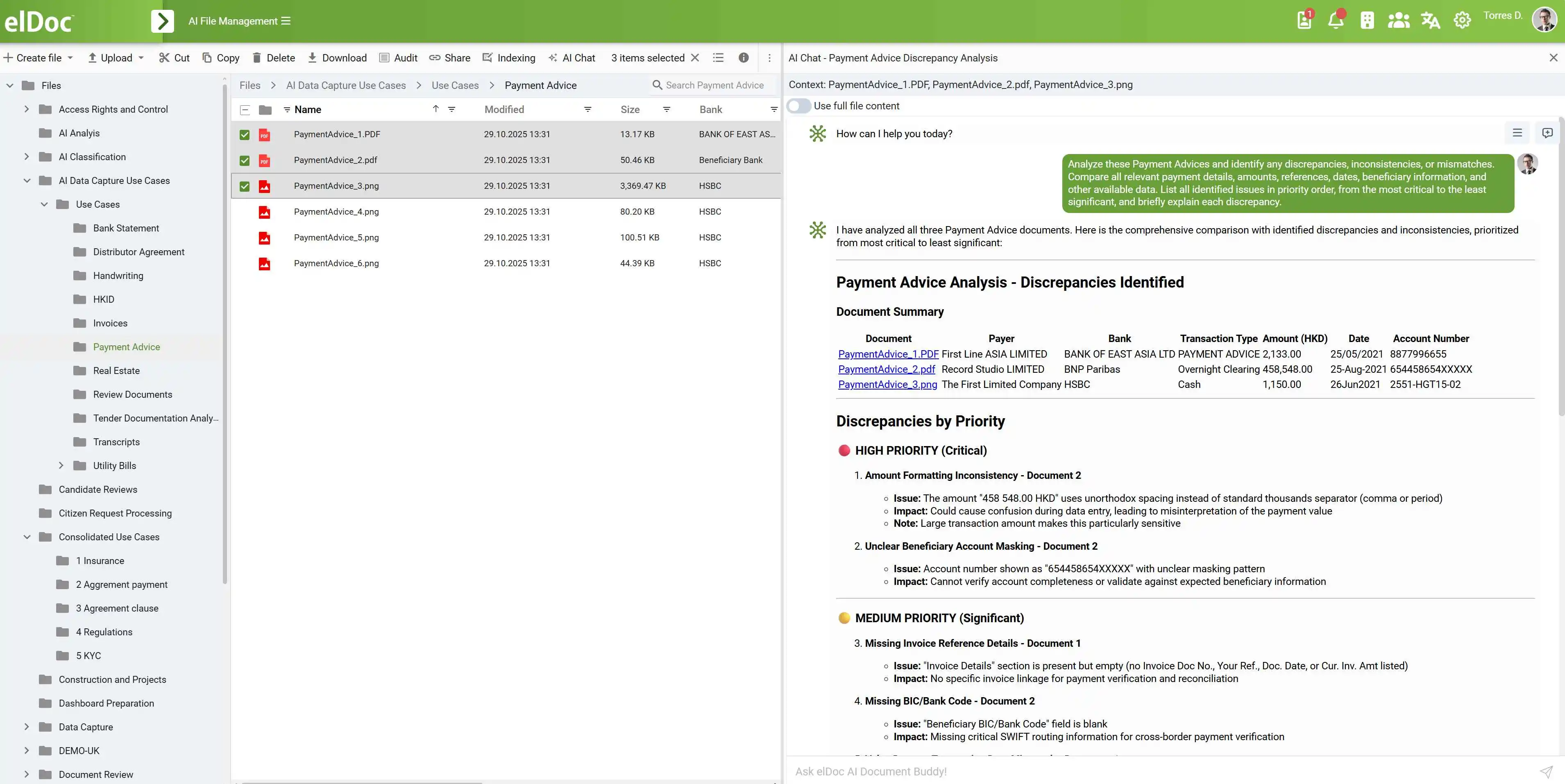
“Find all payment advices where the amount does not match the supporting documentation and identify the most important discrepancies.”
That sounds like an AI problem.
And eventually it is.
But before an LLM can analyze those documents, before RAG can retrieve relevant passages, and before an AI Document Agent can compare the information, the underlying documents need to become machine-readable.
For digitally generated documents with a good text layer, that may already be the case.
For scanned documents and images, it often is not.
OCR is what closes that gap.
The Problem with Treating OCR as a Separate Step
In many document environments, OCR remains a separate process.
A document arrives.
Someone uploads it.
Another service performs OCR.
The resulting file or text needs to be transferred, indexed, or synchronized.
Only then can extraction, search, RAG, or AI processing begin.
This architecture made sense when OCR was primarily about creating searchable PDFs.
It becomes less attractive when organizations want AI to work with documents continuously.
The document has already entered your system. Why should it have to travel through another disconnected processing stage before AI can use it?
elDoc takes a different approach.
OCR Happens as the Document Enters elDoc
There is no separate OCR journey for the user.
A document enters elDoc as a PDF, scan, image, photograph, or another supported format.
OCR can be performed automatically during document ingestion.
By the time the document is available for subsequent processing, its recognized content can already be available to the platform.
Upload → OCR → AI
No additional user action is required.
No separate “run OCR” step needs to become part of the everyday process.
The document simply enters elDoc and becomes available for what comes next.

From OCR to AI — Naturally
This is where the architecture starts to matter.
OCR should not be the destination.
It should be the invisible foundation beneath everything that happens afterwards.
Once recognized, document content can become immediately available for:
AI Data Extraction — capture business information and transform document content into structured data.
AI Document Classification — determine what a document is and how it should be processed.
AI Analysis — analyze individual documents or collections of documents for discrepancies, patterns, missing information, or other business questions.
Agentic RAG — retrieve relevant information from document content and use it as context for AI interaction.
AI Document Agents — allow agents to work with document information as part of defined tasks and processes.
Enterprise Search — make information previously locked inside scans discoverable.
Workflow Automation — use recognized and extracted information to determine what happens next.
The important distinction is that OCR does not sit outside this environment.
It is part of the same document lifecycle.
A document enters elDoc once. From that point, its information can become available to OCR, extraction, AI, search, and automation.
But Not Every Document Is the Same
There is another challenge.
There is no universal enterprise document.
One organization may primarily process clean English-language invoices.
Another may receive application forms in Arabic.
A Hong Kong operation may work with Chinese and English documents within the same environment.
An international business may need to process Latin, Cyrillic, Arabic, Chinese, Japanese, and Korean content.
Then there is document quality.
Some documents are pristine digital PDFs.
Others are twenty-year-old scans.
Some arrive as photographs.
Pages may be rotated, skewed, distorted, or poorly scanned.
And document structures range from a simple paragraph to highly complex financial tables.
That is why relying on a single recognition approach for every scenario can be limiting.
One Platform. Multiple OCR Technologies
elDoc is designed to support multiple document recognition technologies rather than relying on a single OCR engine. This allows organizations to select the recognition approach that best fits their documents, languages, infrastructure, security requirements, and AI use cases.
| Technology | What it is | Key strengths | Deployment | Best suited for |
|---|---|---|---|---|
| Google Cloud Vision OCR | Google Cloud’s managed OCR and computer vision service for detecting and recognizing text in images and documents. | Strong multilingual recognition, scalable cloud processing, handwriting and real-world image recognition capabilities. | Cloud | Organizations prioritizing scalability, broad language support, and managed cloud OCR. |
| PaddleOCR | Open-source OCR toolkit designed for multilingual text and document recognition. | Broad language coverage, document layout capabilities, table recognition, and flexibility for customization. | On-Premises / Private Cloud | Enterprises requiring flexible, multilingual OCR while keeping processing within controlled infrastructure. |
| Tesseract OCR | Mature open-source OCR engine originally developed by HP and later sponsored by Google. | Lightweight, widely adopted, supports many languages, and can operate completely offline. | On-Premises / Air-Gapped | Standard OCR workloads where simplicity, local processing, and infrastructure control are priorities. |
| Vision-Language Models (VLMs) | Multimodal AI models capable of interpreting both visual document content and natural language. | Goes beyond character recognition to reason about document structure, visual context, tables, fields, and relationships between information. | Cloud or On-Premises, depending on model | Complex or highly variable documents where visual understanding and contextual interpretation are important. |
Why Multiple Technologies Matter
There is no universally “best” OCR engine. The appropriate technology depends on the document and business requirement.
A high-volume archive of clean scanned documents may benefit from a different OCR approach than a complex financial statement containing multiple tables and languages. A government organization operating in an isolated environment may prioritize fully offline processing, while another enterprise may prioritize the scalability of a managed cloud service.
The distinction becomes even more important as OCR evolves into Document AI.
Traditional OCR primarily answers:
“What characters and words are on this page?”
Modern document recognition and VLMs can increasingly address a broader question:
“What information is represented on this page, and how is it structured?”
This can be particularly valuable for documents containing complex tables, irregular layouts, visual relationships, mixed content, and information whose meaning depends on its position on the page.
Choose the Recognition Approach Around the Use Case
With elDoc, the recognition layer can be aligned with enterprise requirements rather than forcing every document through the same technology.
Cloud scalability → Google Cloud Vision OCR
Private multilingual processing → PaddleOCR
Offline and air-gapped OCR → Tesseract OCR
Complex visual document understanding → Vision-Language Models
The broader principle is simple:
The OCR architecture should adapt to the document, security, and business requirements — not force the business to adapt to a single OCR engine.
This also strengthens your wider elDoc story: OCR becomes an integrated recognition layer, while AI extraction, Agentic RAG, and Document Agents operate on the resulting document information.
Recognition Should Also Tell You When It Is Uncertain
There is another important part of enterprise document processing: knowing when automation needs help.
Suppose AI extracts an invoice number with very high confidence but encounters an unclear amount on a poor-quality scan.
Those two results should not necessarily be treated the same way.
For intelligent data extraction, elDoc can associate confidence scores with recognized or extracted fields.
Those scores can become part of the business process.
Higher confidence → continue automatically
Lower confidence → request validation
Instead of asking employees to verify every field in every document, organizations can introduce human-in-the-loop processing where it actually adds value.
People focus on exceptions.
Automation handles the rest according to configured rules and thresholds.
Before Building AI on Documents, Make Sure AI Can Read Them
The next generation of document management will not be defined simply by how well organizations store files.
It will be defined by how effectively they can turn the information inside those files into something AI can understand and act upon.
OCR is the first bridge.
But it works best when it is not treated as another application, another integration, or another manual step.
With elDoc, OCR becomes part of the document itself from the moment it enters the platform — across different formats, complex layouts, more than 180 languages, multiple OCR technologies, and deployment models ranging from cloud to fully on-premises.
The result is simple:
Documents enter elDoc. Their information becomes available to AI.
Discover What elDoc AI OCR Can Do with Your Documents
Bring your own document samples to an elDoc demonstration. See how the platform handles your formats, languages, layouts, and real-world document challenges — and how recognized information can move directly into AI-powered processing.