
Fully Offline RAG for Document Chat with elDoc
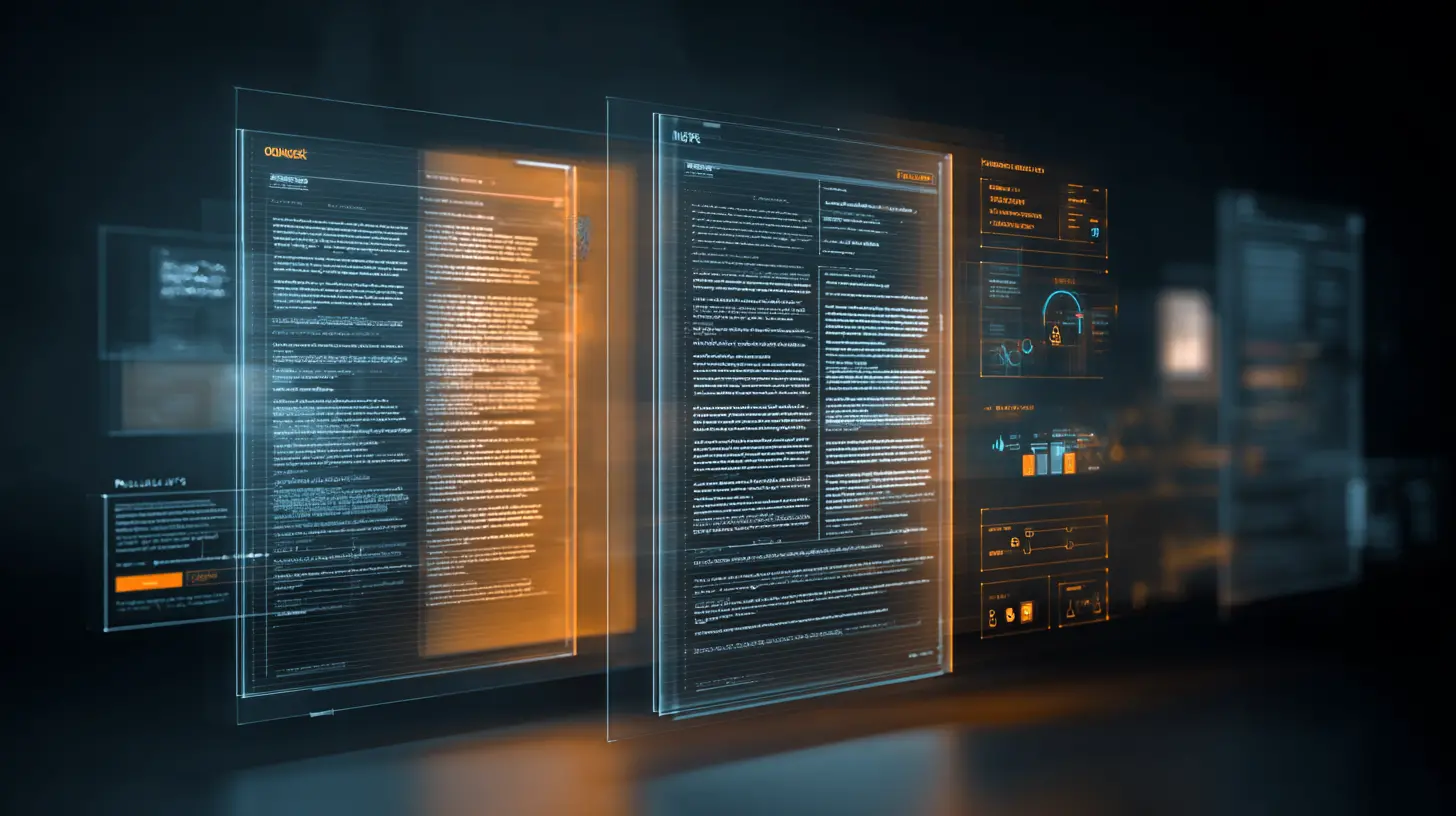
Over the last two years, millions of users have experienced the power of tools like ChatGPT, Gemini, and similar GenAI assistants. They are fast, intuitive, and impressive. You can upload a document, ask a question, and get an answer in seconds. But experienced users quickly notice a fundamental limitation:
These tools process your documents in the cloud, outside your control.
For casual use, this may be acceptable. For anything sensitive, it is not.
The Hidden Security and Compliance Problem with Cloud GenAI Assistants
When documents are uploaded to public GenAI services, they no longer remain within your local environment. Processing takes place on third-party infrastructure, often across multiple regions, where data residency, retention policies, and secondary usage are not always fully transparent. Access controls are typically generic and designed for broad consumer use rather than enterprise-grade governance, leaving compliance and security teams with limited visibility, weak audit trails, and little control over how sensitive information is handled.
These gaps create serious risks when dealing with financial records, legal contracts, health and insurance documents, audit workpapers, and internal corporate knowledge. For organizations operating under regulatory frameworks such as GDPR, financial regulations, or industry-specific compliance standards, this lack of control is often enough to prevent the adoption of public GenAI tools altogether.
The scalability problem with Cloud GenAI Assistant no one talks about
Another issue becomes unavoidable at scale: it makes little sense to upload terabytes of documents every time analysis is required. Most organizations already maintain large, well-secured document repositories across file shares, document management systems, private cloud storage, and on-premises archives. Repeatedly sending the same data to external AI services is inefficient, costly, slow, and introduces unnecessary operational risk. A far more practical approach is for documents to remain securely inside the organization’s perimeter, be indexed once using AI, and then be queried intelligently whenever insights are needed.
What “Fully Offline RAG” for document chat actually means — and whether it’s really possible
When people hear “chat with your documents,” they often assume that some part of the process must rely on the internet or external AI services. In reality, fully offline Retrieval-Augmented Generation (RAG) is not only possible – it is already achievable in production environments when the platform is designed correctly.
At its core, RAG is the architectural pattern that allows GenAI to work reliably with private documents. Instead of asking a language model to “guess” answers, the system first retrieves the most relevant passages from a trusted internal document corpus and then generates an answer strictly grounded in that retrieved content. This is what makes document chat accurate, explainable, and usable for real business scenarios.
What makes a solution fully offline is not the chat interface itself, but the fact that every step of this pipeline runs entirely inside your own infrastructure whether on-premises or within a private cloud tenant. No document content, metadata, embeddings, prompts, or responses are ever sent to external APIs.
Yes, this is possible and elDoc is built specifically to make it practical.
How elDoc makes fully offline document chat real
elDoc is a GenAI platform available for fully on-premise, air-gapped, or private-cloud deployments. It is shipped as a complete, self-contained system that includes all the components required for offline document understanding, retrieval, and conversational interaction.
The process begins with document ingestion and understanding. elDoc integrates multiple OCR engines to handle the diversity and inconsistency of real-world documents. Depending on deployment requirements, this includes open-source OCR for general extraction, high-accuracy OCR for complex layouts, vision-language models with built-in layout understanding, and ultra-fast multilingual OCR for large-scale processing. This flexibility allows organizations to balance accuracy, speed, and strict offline requirements.
Before any language model analyzes a document, elDoc applies a computer vision layer that cleans, normalizes, and optimizes document images. Skewed scans, poor contrast, noisy backgrounds, tables, stamps, and signatures are corrected and structured so downstream AI models work with high-quality inputs.
Once documents are optimized, large language models running locally provide true semantic understanding. These models do not simply extract text; they interpret meaning, context, relationships, and intent across paragraphs, tables, and sections. This is what enables users to ask natural questions instead of keyword searches.
Chat with your documents: from private use to enterprise-scale intelligence
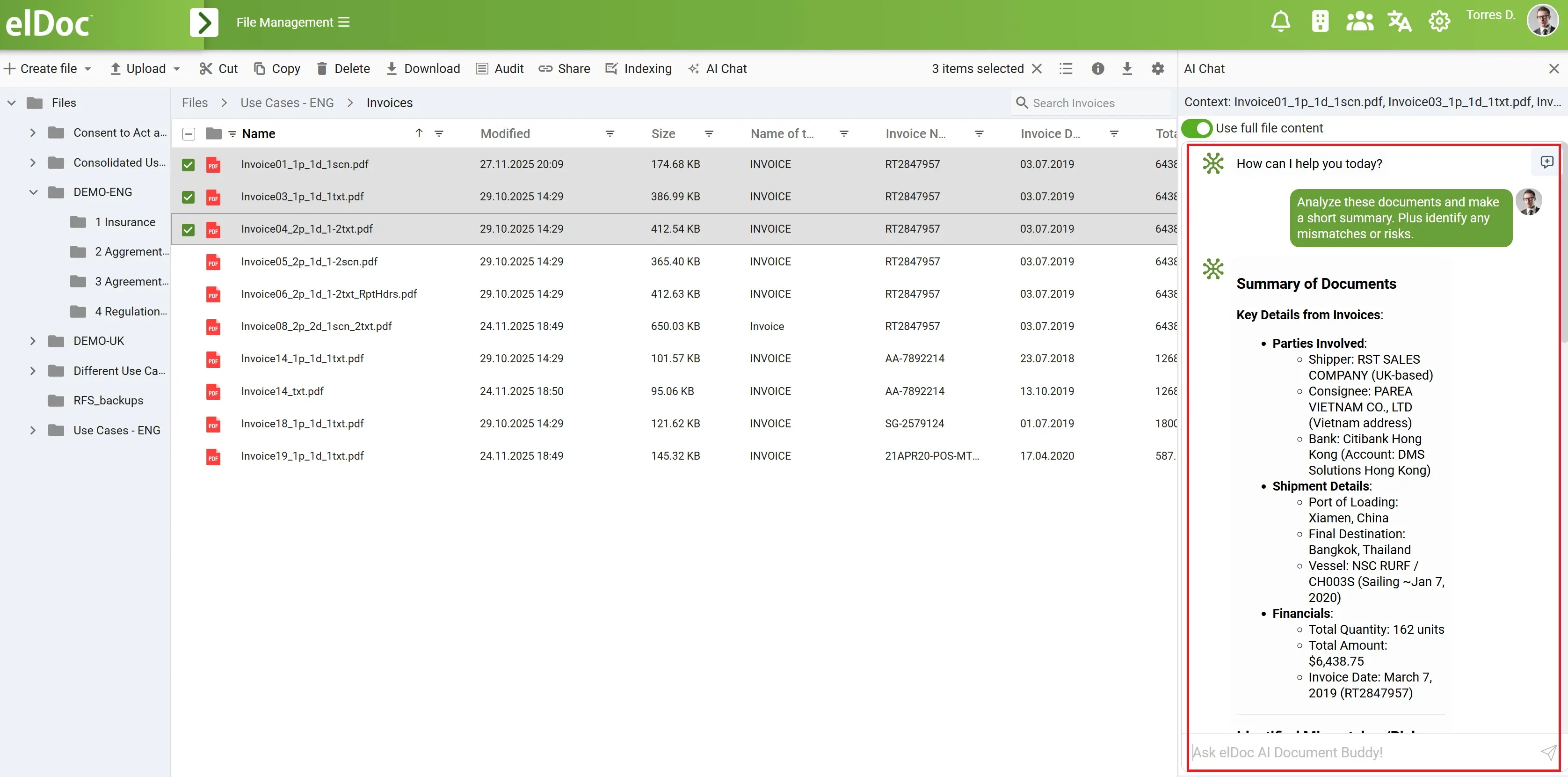
Once elDoc is deployed, documents are no longer static files stored in folders—they become a secure, interactive knowledge base that users can query in natural language. Instead of opening files one by one, searching manually, or exporting data to external tools, users simply chat with their documents in a fully offline and governed environment.
For private individuals, elDoc provides clarity and confidence when dealing with highly sensitive personal documents. Users can review health records, insurance policies, or legal agreements without exposing private data to public GenAI platforms. Typical enquiries include:
“Please analyze my health records and highlight any missing information or inconsistencies that could affect my treatment or insurance coverage.”
“Based on my insurance policy, is this claim covered, and are there any exclusions or conditions I should be aware of?”
In small and medium-sized organizations, elDoc becomes a daily productivity tool for finance, operations, and legal teams. Instead of manually reviewing files, teams can query entire document sets at once, gaining instant insights across invoices, contracts, and correspondence. Common enquiries include:
“Across all invoices and contracts, identify overdue payments, inconsistent terms, and any discrepancies between agreed and billed amounts.”
At the enterprise level, elDoc enables secure, large-scale document intelligence across departments and regions while enforcing strict access controls and auditability. Finance, legal, audit, and compliance teams can ask complex, cross-document questions that would otherwise require days or weeks of manual work. Typical enquiries include:
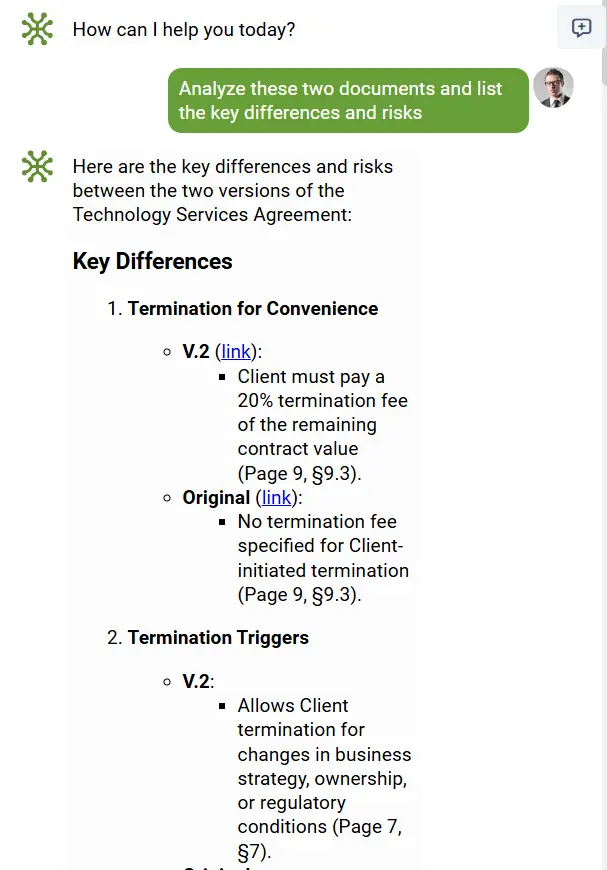
“Compare all contract versions and flag clauses related to termination, liability, and penalties that deviate from our standard policy.”
“Review our audit workpapers over the last three years and highlight material changes, anomalies, or missing supporting evidence.”
Across all use cases, the experience remains consistent: documents stay securely inside your environment, permissions are enforced automatically, and every answer is grounded in the actual content of approved documents. elDoc delivers conversational GenAI for real-world documents—without compromising privacy, security, or control.
Storage, retrieval, and semantic intelligence – all offline
Fully offline RAG also requires robust storage and retrieval layers. elDoc uses a scalable document store to manage both large files and rich metadata efficiently, ensuring documents remain available, versioned, and auditable over time. On top of this, a dedicated vector database creates semantic embeddings locally, giving documents “meaning” that can be searched beyond simple keywords. This allows the system to retrieve relevant content even when users phrase questions imprecisely or in natural language.
For exact matching and high-speed filtering, elDoc combines semantic retrieval with full-text search capabilities. The result is a hybrid retrieval approach that works reliably across contracts, invoices, statements, policies, and scanned documents—without ever reaching outside your environment.
How easy it is to deploy elDoc and start chatting with your documents?
Despite the sophisticated architecture required to enable fully offline document chat covering secure storage, OCR engines, computer vision, local LLMs, semantic search, and governance deploying elDoc is intentionally simple. The complexity is built into the platform, not pushed onto the user or IT team.
elDoc is delivered as a containerized solution, allowing it to be deployed consistently across environments. Whether you are an individual user, a small team, or a large enterprise, deployment follows the same straightforward approach: run the container within your on-premise infrastructure or private cloud tenant. There is no need to assemble separate components, integrate multiple vendors, or manage fragile pipelines everything required to chat with documents securely is packaged and ready.
Once deployed, getting started is immediate. You connect your preferred large language model based on your available hardware resources, whether that is CPU-only, GPU-accelerated, or a hybrid setup. elDoc is model-agnostic, allowing organizations to choose the LLM that best fits their performance, cost, and security requirements all while keeping inference fully local.
After that, users simply upload documents or connect existing repositories, trigger indexing, and begin chatting. New documents can be added at any time and are automatically incorporated into future queries without reprocessing existing data. From first deployment to meaningful document conversations, elDoc reduces what is traditionally a complex GenAI infrastructure project to a practical, repeatable, and secure setup.
In short, elDoc makes enterprise-grade, fully offline document chat accessible without sacrificing control, flexibility, or ease of deployment.
elDoc Community Edition: local RAG for your documents
To make fully offline document intelligence accessible beyond large enterprises, elDoc is also available as a Community Edition. This version is designed for individual users, developers, and small teams who want to run RAG-based document chat locally—on a laptop, workstation, or small server—without sending documents to the cloud.
The Community Edition delivers the core capabilities required to chat with documents securely. Users can upload files, index them locally, and ask natural-language questions across their document collection. All processing happens on the local machine or within the user’s private environment, ensuring full data privacy and control. There is no dependency on external AI services, making it ideal for experimenting with GenAI on sensitive documents.
Despite being lightweight, the Community Edition still follows the same architectural principles as the enterprise platform. Documents are processed using OCR and computer vision, indexed into a local semantic store, and queried through a RAG pipeline backed by a locally running language model. Users simply connect an LLM that matches their available hardware resources CPU or GPU and start chatting.
elDoc Community Edition is perfect for:
- Small teams to run it locally
- Testing document chat workflows before enterprise rollout
- Privacy-conscious users who want AI assistance without cloud exposure
With elDoc Community Edition, powerful document chat is no longer limited to complex enterprise deployments. It brings secure, local, RAG-powered intelligence to anyone who wants to work with documents privately and efficiently.
What elDoc Community Edition is shipped with: the full local AI stack
The elDoc Community Edition is not a stripped-down demo. It is shipped as a fully functional local RAG platform that includes the complete AI pipeline required to extract, understand, search, and chat with documents running entirely on your own machine or local environment.
Even though the underlying architecture is sophisticated, all components are pre-integrated and orchestrated for you. The result is a seamless experience: upload documents, index them once, and start asking questions without templates, manual configuration, or cloud dependencies.
Below is the full stack included with elDoc Community Edition.
OCR — converting images and PDFs into text
Most documents especially invoices arrive as scans, images, or non-searchable PDFs. OCR is the first critical step that transforms these files into machine-readable text so AI can actually understand them.
In the Community Edition, elDoc ships with offline-capable OCR engines, including:
- Tesseract OCR – open-source OCR for general-purpose text extraction
- PaddleOCR – extremely fast, multilingual OCR optimized for diverse layouts and formats
- Qwen3-VL – vision-language OCR with built-in layout understanding for complex documents
These engines enable accurate text extraction from noisy, low-quality, or multilingual documents while keeping all processing local.
Computer Vision — cleaning and normalizing documents
Before OCR output is passed to AI models, elDoc applies a dedicated computer vision preprocessing layer. This step dramatically improves accuracy and reliability.
The Computer Vision layer performs deskewing and alignment of rotated pages, denoising and contrast enhancement, and layout normalization. By standardizing messy real-world documents, elDoc ensures downstream AI models work with clean, structured inputs one of the most critical factors for successful RAG.
LLM — true understanding of content
At the core of elDoc Community Edition is a locally running Large Language Model. This model acts as the reasoning engine that understands documents the way a human would but faster and more consistently.
The LLM interprets meaning, context, and intent across unstructured text, tables, and sections. It extracts key fields such as totals, dates, taxes, suppliers, and line items, classifies documents without templates, and detects inconsistencies or anomalies. This is what enables natural-language queries instead of rigid rules or keyword searches.
Users simply connect the LLM that fits their available hardware CPU or GPU and elDoc handles the rest.
RAG — connecting context across documents
Retrieval-Augmented Generation (RAG) is what turns individual documents into a connected knowledge base. In elDoc Community Edition, RAG enables the system to retrieve relevant passages across documents and use them as grounded context for AI-generated answers. This allows users to validate data across files, detect inconsistencies, and ask complex questions that span multiple documents such as comparing invoices, checking alignment with contracts, or summarizing trends across a dataset.
RAG ensures answers are always based on real document content, not assumptions or hallucinations.
MongoDB — scalable document storage
MongoDB serves as the primary document and metadata store in elDoc. It efficiently manages both large files and structured extraction results, even when document structures vary widely. Its flexible schema, fast retrieval, and reliability make it ideal for local document intelligence workflows, forming the backbone of elDoc’s structured data layer.
Qdrant — semantic intelligence and vector search
Qdrant provides semantic understanding through vector embeddings generated locally. It allows elDoc to find meaning beyond keywords—detecting similar documents, duplicates, and relationships across files. This semantic layer is essential for intelligent retrieval, document clustering, and accurate RAG-based question answering.
Apache Solr — high-speed full-text search
Apache Solr complements semantic search with enterprise-grade keyword indexing. It enables instant full-text search, filtering, ranking, and navigation across large document sets.
Together, Solr and Qdrant form a hybrid search engine: keyword precision combined with semantic understanding and AI reasoning.
Validation station — scoring, confidence, and exception management
Beyond extraction, elDoc includes a Validation Station that evaluates the quality and reliability of AI results.
This layer assigns confidence scores to extracted fields, flags low-confidence or conflicting data, and identifies exceptions that require human review. Validation rules can be applied across documents to detect missing fields, inconsistent values, threshold breaches, or mismatches between related files (for example, invoices vs. contracts or policies). The Validation Station enables a human-in-the-loop workflow, ensuring AI outputs are transparent, auditable, and production-ready rather than treated as black-box results.
Robust security framework — roles, permissions, and governance
Security is built into elDoc from the ground up, even in the Community Edition. The platform includes a role-based access control (RBAC) framework that defines clear roles and responsibilities across users and teams. Permissions can be applied at the workspace, folder, document, and feature level including access to GenAI functions such as indexing, chat, export, and file sharing.
elDoc supports multi-factor authentication (MFA) for secure access and can be integrated with enterprise identity providers, including Active Directory (AD) or directory-based authentication systems. This ensures consistent identity management, centralized user control, and alignment with existing security policies.
All actions are logged, creating a clear audit trail for document access, AI interactions, and validation decisions critical for compliance, governance, and trust.
In addition to security and governance, elDoc supports high-availability deployments. Thanks to its containerized architecture, elDoc can be deployed in clustered or replicated configurations to eliminate single points of failure. This allows organizations to ensure continuous access to document intelligence, scale workloads across nodes, and maintain operational resilience even during maintenance or infrastructure disruptions.
Together, these capabilities make elDoc suitable not only for experimentation, but for secure, reliable, and always-on document intelligence from individual users to mission-critical enterprise deployments.