
Data Extraction from PDFs and Scans with GenAI: How OCR, LLM, and RAG Transform Document Intelligence
Extracting data from PDFs and scanned documents has always been one of the most painful challenges in digital operations. For years, organizations depended on template-based extraction systems that required creating, configuring, and maintaining separate templates for every document type, vendor, layout, and format. If one field moved even a few pixels, the template broke. If a new supplier appeared, the IT team had to build another configuration. And if multiple layouts existed for the same document category, the complexity multiplied.
Traditional OCR could read text, but it could not understand what it was reading or where each piece of information belonged. It treated documents like flat images, ignoring their structure, meaning, and relationships. As a result, companies spent enormous time fine-tuning templates, validating results, and manually correcting extraction errors. The process was slow, expensive, rigid, and resistant to scale.
Modern GenAI changes all of this. Instead of forcing the organization to adapt to the limitations of templates, GenAI adapts to the document itself. By combining OCR, Computer Vision, Large Language Models (LLMs), and Retrieval-Augmented Generation (RAG), organizations can finally move beyond basic text recognition toward true document understanding.
How elDoc Makes Data Extraction Simple and Effortless for End Users
While many platforms claim to use AI for document processing, most still rely on traditional OCR combined with rigid templates or predefined extraction rules. elDoc takes a fundamentally different approach. Instead of treating documents as static text files, elDoc processes them as intelligent, multi-layered artifacts — each containing visual structure, semantic meaning, contextual logic, and business relationships.
elDoc’s architecture is built around four tightly integrated pillars: OCR, Computer Vision, Large Language Models, and Retrieval-Augmented Generation. Together, they form a unified GenAI pipeline capable of interpreting documents with human-like reasoning while maintaining the consistency and speed required for enterprise operations.
While the underlying GenAI pipeline is highly advanced, elDoc was designed so that end users never have to think about OCR engines, model configurations, preprocessing steps, or document logic. Everything happens automatically behind the scenes. What users experience is a clean, intuitive workflow that turns even the most complex PDFs and scans into structured, reliable data in just a few steps.
1. Upload Files Manually or Automatically — OCR and Computer Vision applied automatically
Users can add documents to elDoc in the simplest ways possible:
- Drag-and-drop manual uploads
- Automatic ingestion from monitored folders
- Email-to-elDoc pipelines
- API-based integrations with ERP, SharedDrive, OneDrive or CRM systems
The moment a file enters elDoc, processing begins. There is no need to configure templates, define document types, or prepare extraction rules. As soon as a PDF or scanned image arrives, elDoc automatically runs OCR to extract text. Unlike traditional systems that require choosing an engine manually or switching tools depending on language, quality, or document complexity, elDoc abstracts all of this.
elDoc supports multiple OCR engines — optimized for cloud, on-premise, multilingual content, and high-accuracy scenarios. If the document requires structural understanding, Computer Vision is applied automatically. elDoc handles the technical steps for the user: Table and key-value detection: image orientation correction, noise reduction, skew and perspective adjustment, layout segmentation. End users do not have to adjust brightness, rotate images, or worry whether the document is “good enough”. elDoc normalizes everything before applying deeper processing, ensuring the best extraction quality without manual intervention.

2. Hit the “AI Indexing (AI Data Capture)” Button — No Templates, No Configuration Required
Once the files are uploaded, the user simply clicks AI Indexing (AI Data Capture). That’s it — no templates to design, no fields to draw on the screen, no rules to program, and no document types to configure beforehand. With a single click, elDoc activates its full GenAI pipeline. OCR reads the document, Computer Vision interprets the layout, LLMs understand the meaning, and RAG grounds the extraction in your business logic. This all happens automatically, without the user making any decisions or performing setup.
The experience is intentionally simple: Upload → Click AI Indexing → Get structured data.
Behind the scenes, elDoc performs tasks that used to require specialized teams — but the user sees only an elegant, one-button workflow that works across invoices, purchase orders, forms, contracts, reports, KYC documents, shipping papers, and more.

3. View Your Captured Data — Individually or in Bulk, With Full Visual Context
After elDoc completes AI Indexing, users can immediately review the extracted data in the way that best fits their workflow. The platform gives complete flexibility — whether you want to inspect one document in detail or analyze hundreds at once.
For individual review, users can open any document and see a side-by-side visualization:
- the original PDF or scanned image on one side, and
- the extracted, structured data on the other.
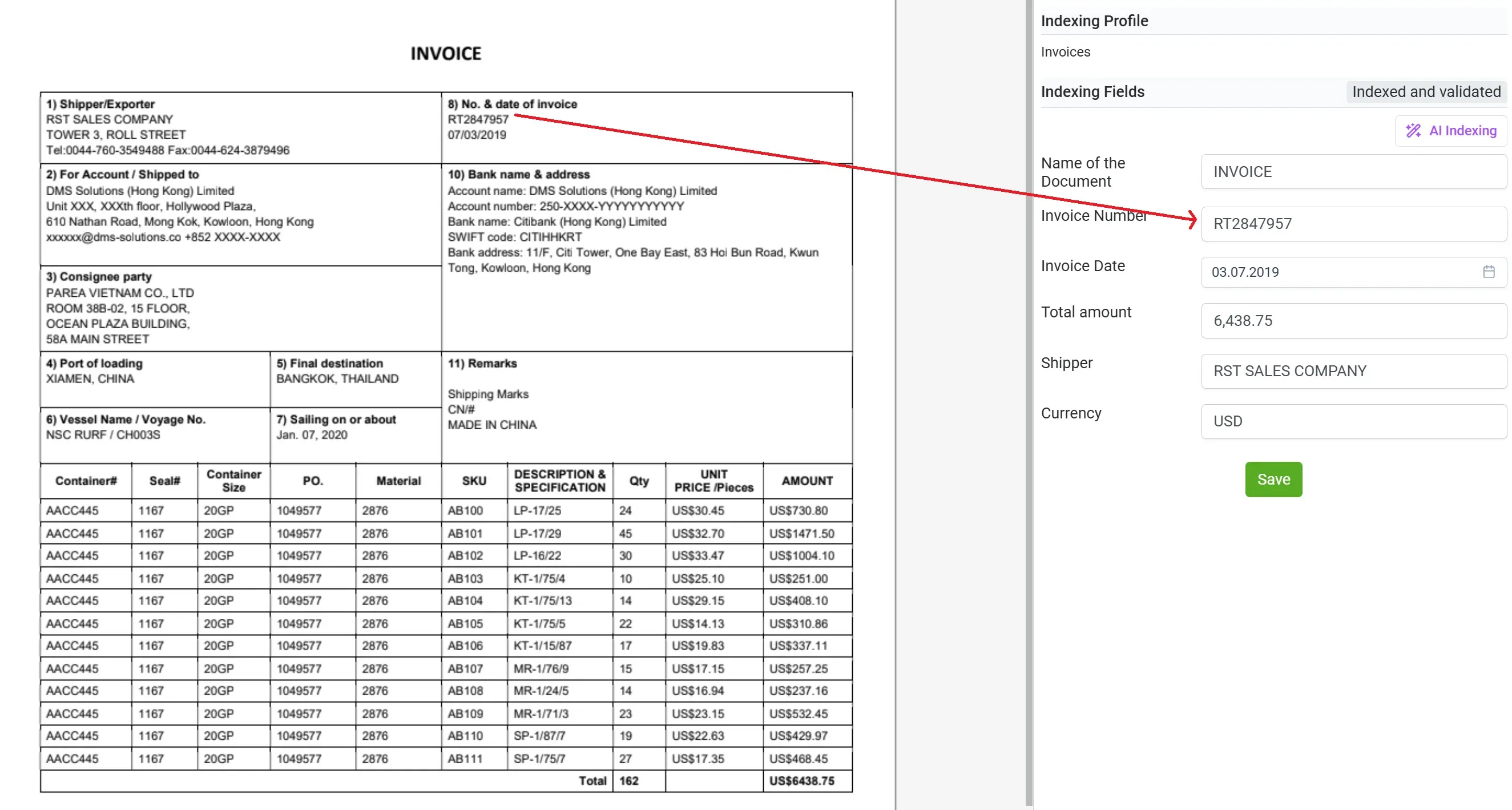
This makes verification incredibly fast. You don’t need to switch tabs, search for fields, or guess where the data came from. Every detected field is clearly shown, and you can confirm accuracy visually, line by line, in real time.
If required, users can expand a table, inspect line items, check subtotals, review dates, and validate totals — all without leaving the document view.
For bulk review, elDoc provides a powerful consolidated dashboard. You can see captured data for all processed documents at once. This view supports:
- filtering by document type, vendor, date, status, or any extracted field
- reorganizing columns and customizing your layout
- grouping and sorting to match your internal workflow
- exporting subsets of data for downstream systems
- identifying anomalies or missing information across multiple files instantly
This makes it easy to handle high-volume document batches with the same precision as a single document. Rather than opening PDFs one at a time or manually copying values into spreadsheets, users get a clean, structured, ready-to-analyze dataset presented in a familiar table view.
elDoc gives each user control over how they want to work: detailed validation with visual context, or high-level data operations across thousands of documents. Both experiences are designed to feel intuitive and effortless, powered quietly in the background by GenAI, OCR, Computer Vision, and RAG.

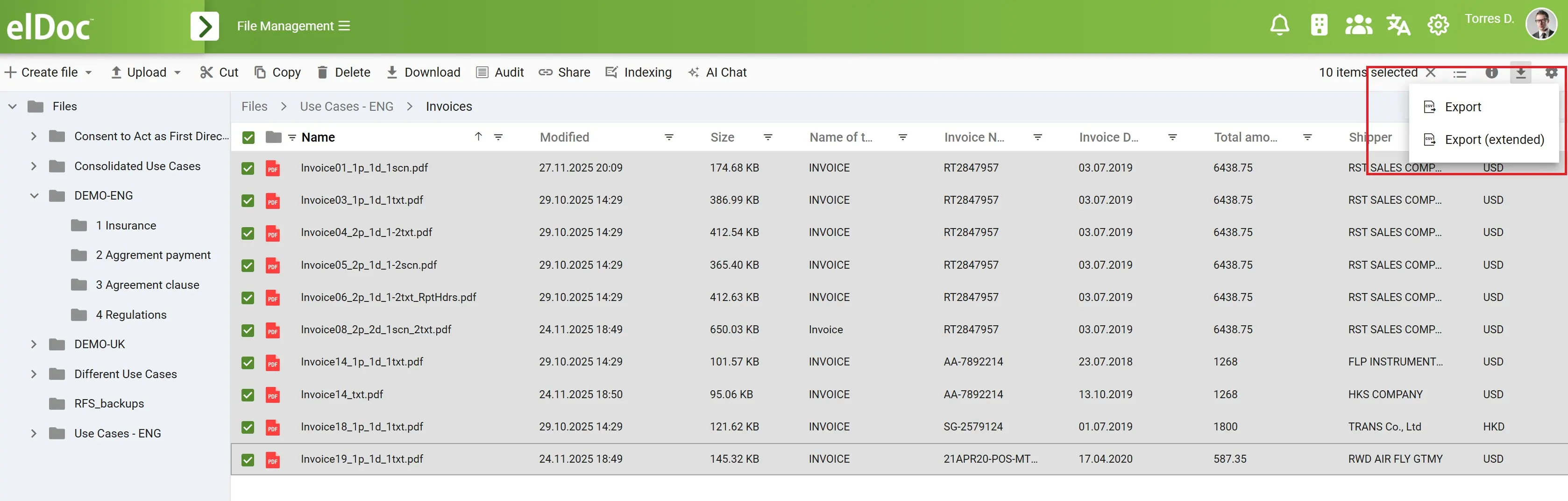
4. Export Your Extracted Data to CSV in One Click — Ready for Any Workflow
Once you’ve reviewed your captured data — whether individually or across an entire batch — elDoc makes it effortless to export everything you need. With a single click, users can download all extracted fields, tables, and structured information into a clean, ready-to-use CSV file. There is no need for manual copy-paste, no data cleaning, no spreadsheet formatting, and no dealing with inconsistent structures. elDoc automatically organizes the extracted information into a standardized format that fits seamlessly into your workflows.
The exported CSV is immediately usable. Every column is labeled, every row is consistent, and every entry reflects the information captured from your documents. For bulk processing, this feature becomes extremely powerful. Users can process hundreds—or thousands—of documents through AI Indexing and export one consolidated CSV that contains all extracted data. Filters, custom views, and field selections allow you to export exactly what you need, nothing more and nothing less.
This transforms what used to be hours (or days) of manual extraction work into a simple workflow:
Upload → AI Indexing → Review → Export.
With one click, your organization receives clean, structured, validated data—ready to flow into the systems that depend on it. The heavy lifting is handled by OCR, Computer Vision, LLMs, and RAG, but the user experiences a smooth, frictionless process designed for everyday business operations.
5. Chat With Your Data Using GenAI — Ask Anything, Get Instant Answers
Once your documents are indexed and structured, elDoc unlocks a powerful capability: you can chat directly with your extracted data using GenAI. Instead of manually searching through invoices, statements, forms, or reports, you simply ask questions in natural language — and elDoc provides precise, contextual answers.
Users can perform deep financial analysis, comparisons, summaries, classifications, or validations instantly. For example, you can ask:
- “Summarize all invoices from Vendor X for the last quarter.”
- “What is the total VAT amount across these 150 invoices?”
- “Show me all transactions above HKD 50,000 in my bank statements.”
- “Compare the payment terms across all received POs.”
- “Highlight invoices with mismatched totals or potential errors.”
- “Give me a category-wise breakdown of expenses.”
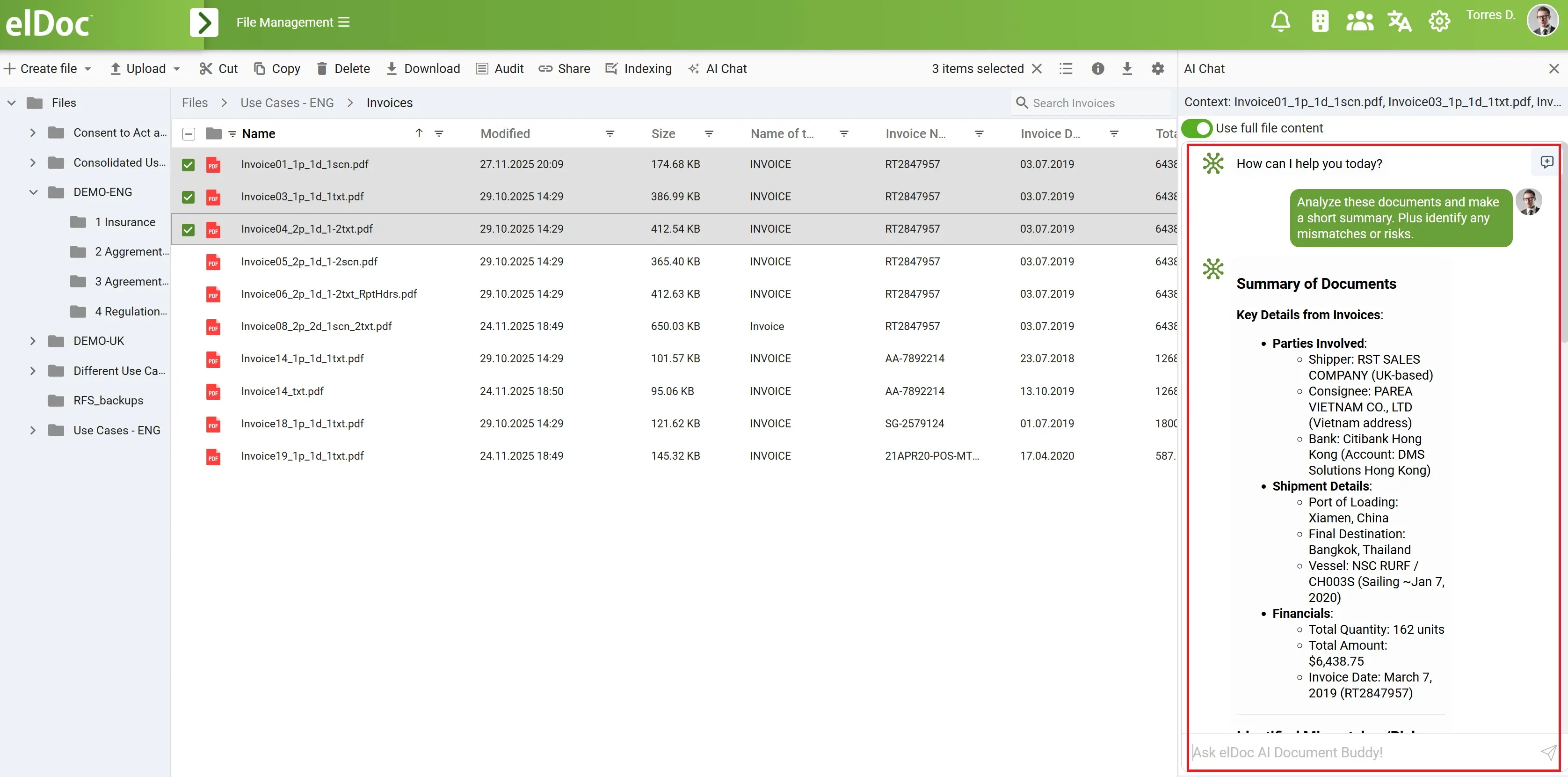
elDoc’s GenAI engine uses the structured data captured during the extraction process, along with context from the original documents, to generate accurate and fully grounded responses. Combined with RAG and vector search, the system retrieves relevant information and ensures answers are reliable and compliant with your internal business rules.
This turns your extracted data into an intelligent knowledge layer that can be queried, analyzed, and understood conversationally — without spreadsheets, formulas, or complex queries.
Even large document batches become easy to explore. Users no longer need to manually cross-check values or run pivot tables. They simply ask, and elDoc delivers insights, summaries, and detailed references back to the source documents when needed. GenAI transforms static document data into a dynamic, interactive asset — empowering finance, compliance, operations, and audit teams to work smarter, faster, and more confidently.