
Automated Utility Bills Processing: Intelligent Bills Capture, Data Extraction, and Secure Auto-Filing with GenAI
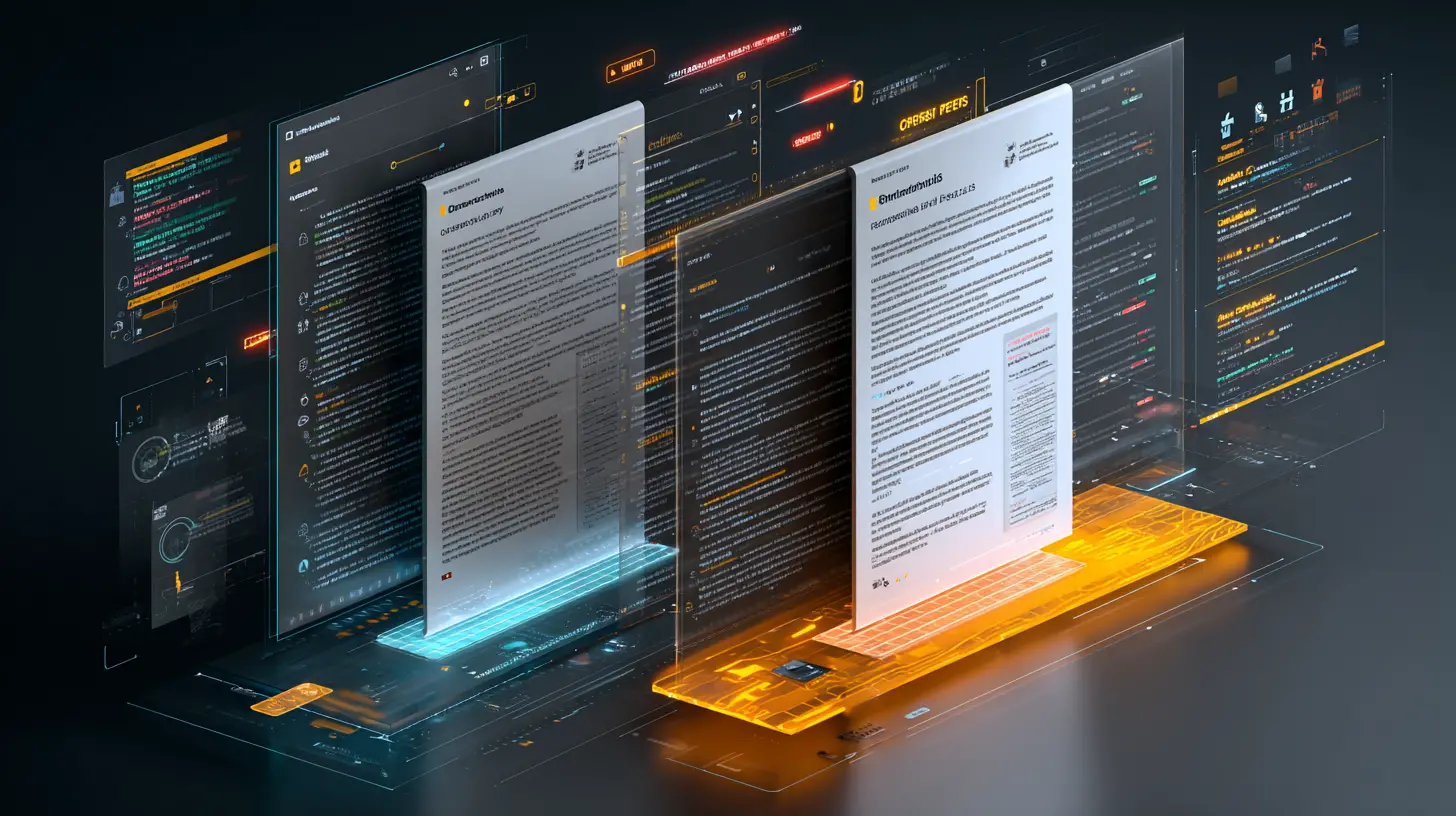
Utility bills affect far more than just accounting departments. From construction and engineering companies managing electricity, water, and temporary utility connections across multiple sites, to real estate and property management firms tracking consumption across buildings, tenants, and locations, utility bills are a constant operational dependency. In manufacturing, utilities directly impact production costs, margins, and sustainability reporting. In the public sector, they play a critical role in budgeting, transparency, and audit readiness. Even banks and financial institutions process large volumes of utility bills not as payables, but as part of compliance and verification workflows. Utility bills are commonly used for: Know Your Customer (KYC) checks, Proof of address validation, Client onboarding and periodic reviews, In these environments, accuracy, traceability, security, and auditability are mandatory.
How elDoc Delivers an End-to-End Workflow for Utility Bills Handling
1. Capture Utility Bills from Email and Web-Based Systems
Utility bills arrive from many sources, and elDoc handles all of them seamlessly.
Bills can be captured automatically from:
- Dedicated email inboxes (e.g., utilities@company.com)
- Shared mailboxes or user mailboxes
- Manual uploads via web interface
- Downloads from utility provider portals
- Scanned paper documents and photos from scanners
Organizations can configure elDoc to:
- Automatically ingest all utility bills from specific email senders or domains
- Extract attachments and emails without manual intervention
- Upload documents in bulk when downloading from utility portals
This means teams no longer need to manually save files, rename documents, or move them between folders. Every incoming utility bill is captured centrally and consistently.
2. Intelligent Document Recognition and Classification
No matter how utility bills arrive whether as mobile photos, scanned images, or PDF files elDoc automatically processes them end to end.
As soon as a document is captured, elDoc applies OCR to convert visual content into machine-readable text. When required, computer vision is used to automatically normalize image orientation, correct rotation, enhance readability, and handle low-quality scans. This ensures consistent and reliable data extraction even from imperfect inputs.
Once the text is captured, LLMs embedded within elDoc analyze the document contextually. Instead of relying on fixed templates or vendor-specific rules, elDoc understands the structure and meaning of the document.
At this stage, elDoc immediately recognizes and classifies the document by type.
Using AI-driven classification, the system automatically identifies:
- Utility bills versus other document types
- Electricity, water, gas, telecom, internet, or facility-related charges
- Utility provider, vendor, and service category
Based on this classification, documents are automatically routed to the correct processing workflow without templates, predefined layouts, or manual configuration.
Regardless of how the bill looks or which provider issued it, elDoc adapts dynamically and processes it consistently.
3. Context-Aware Data Extraction
From Raw Text to Trusted, Structured Data
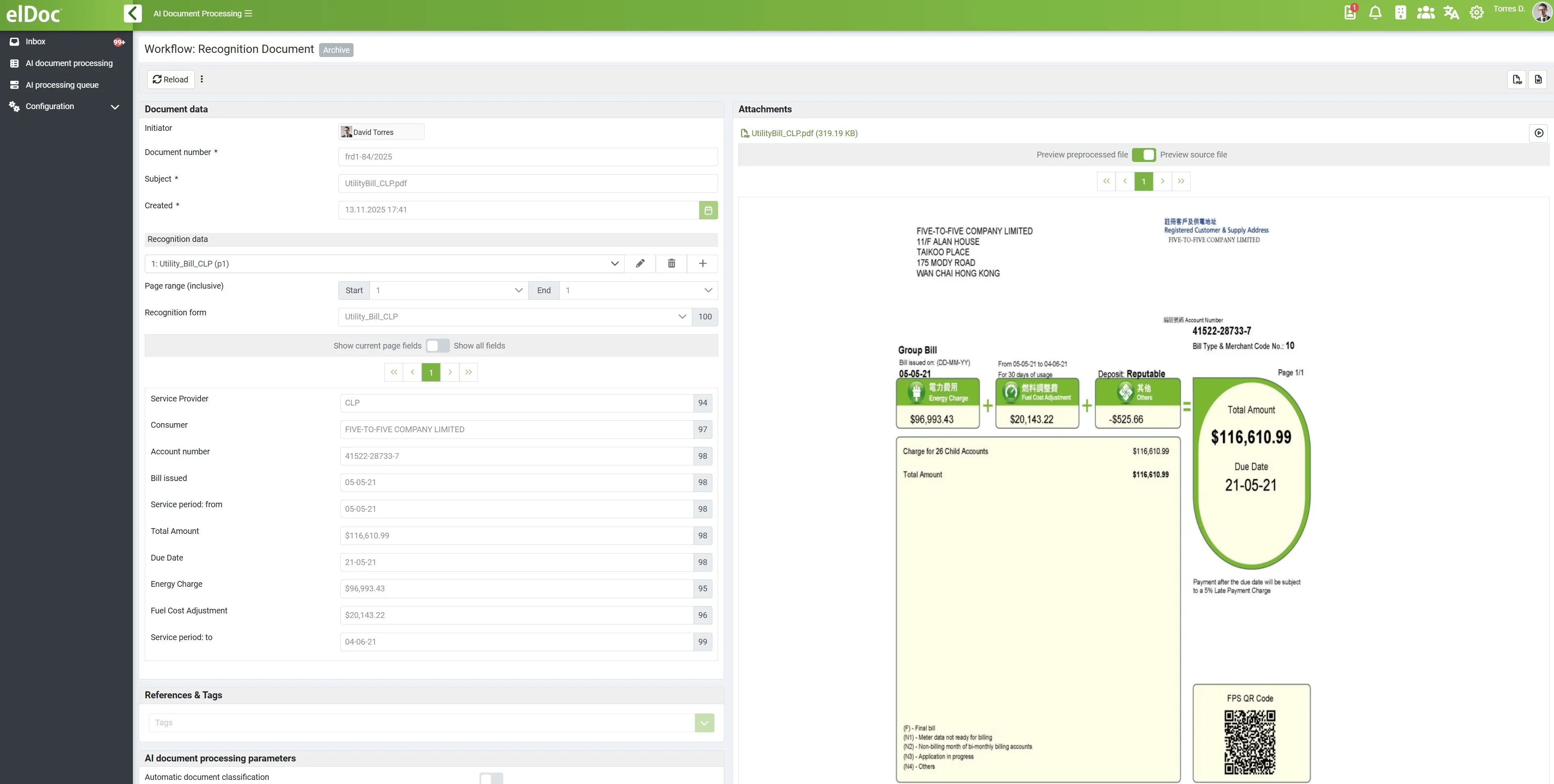
elDoc does not simply extract text from utility bills it understands the document in context.
After OCR and document classification, LLMs embedded within elDoc analyze the full structure and meaning of the bill. This allows the system to distinguish between similar-looking fields, interpret billing logic, and accurately identify the information that actually matters for business, finance, and compliance processes.
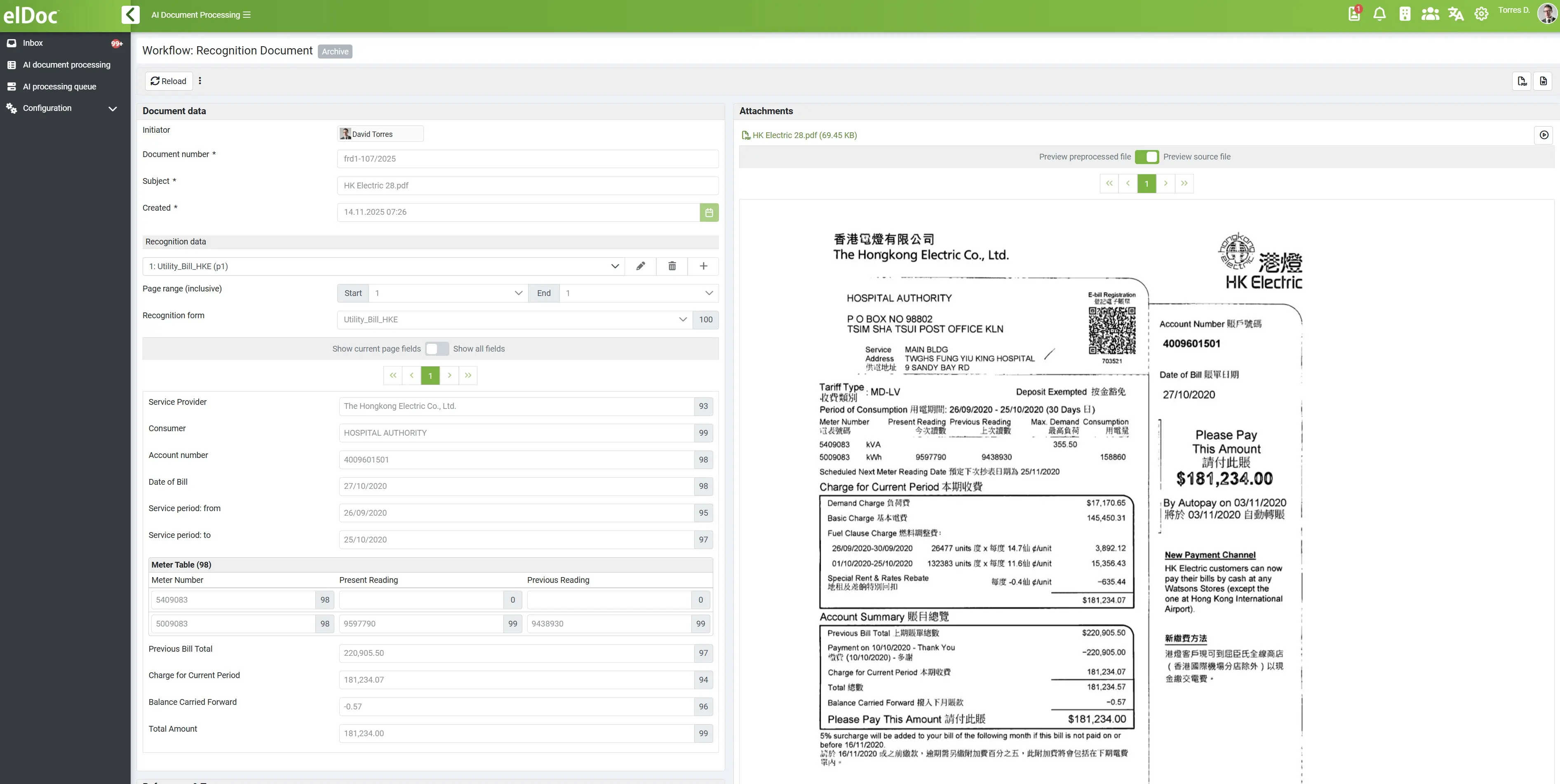
Instead of capturing disconnected text fragments, elDoc extracts and structures business-ready utility data, including:
- Utility provider name and account or customer number
- Billing period, issue date, and due date
- Consumption values with correct units (kWh, m³, minutes, data usage, etc.)
- Line items, subtotals, taxes, surcharges, and the final payable amount
- Service address, site location, or meter identifiers
This contextual understanding is critical. For example, elDoc can differentiate between:
- Billing period dates vs. meter reading dates
- Subtotals vs. totals
- Multiple meters or services listed on the same bill
- Charges, credits, adjustments, and carry-over balances
4. Ready for Validation, Automation, and Analysis
From Structured Data to Intelligent Action
Because utility bill data in elDoc is extracted with full context and normalized at capture time, it becomes immediately actionable without manual preparation or reformatting. This structured, trusted data allows GenAI to operate on top of the documents, not just inside them.
Field-Level Validation and Consistency Checks
Once utility bill data is extracted and normalized, elDoc performs systematic validation at the field level.
Each key data element is checked individually to ensure accuracy and consistency before any downstream processing occurs.
Validation rules can include:
- Required field presence (e.g., billing period, total amount, provider)
- Numerical consistency (subtotals + taxes = total)
- Threshold validation (values within expected ranges)
- Historical comparison (against previous bills)
- Duplicate detection (same provider, period, and amount)
For example:
- If consumption exceeds a defined threshold, the bill is flagged
- If totals do not mathematically reconcile, an exception is created
- If a billing period overlaps or is missing, the workflow pauses
This ensures that only validated, reliable data moves forward.
Validation is applied per field, not just per document – so errors are detected precisely and early.
Deep Utility Bills Analysis with GenAI
Understanding Behavior, Patterns, and Risk
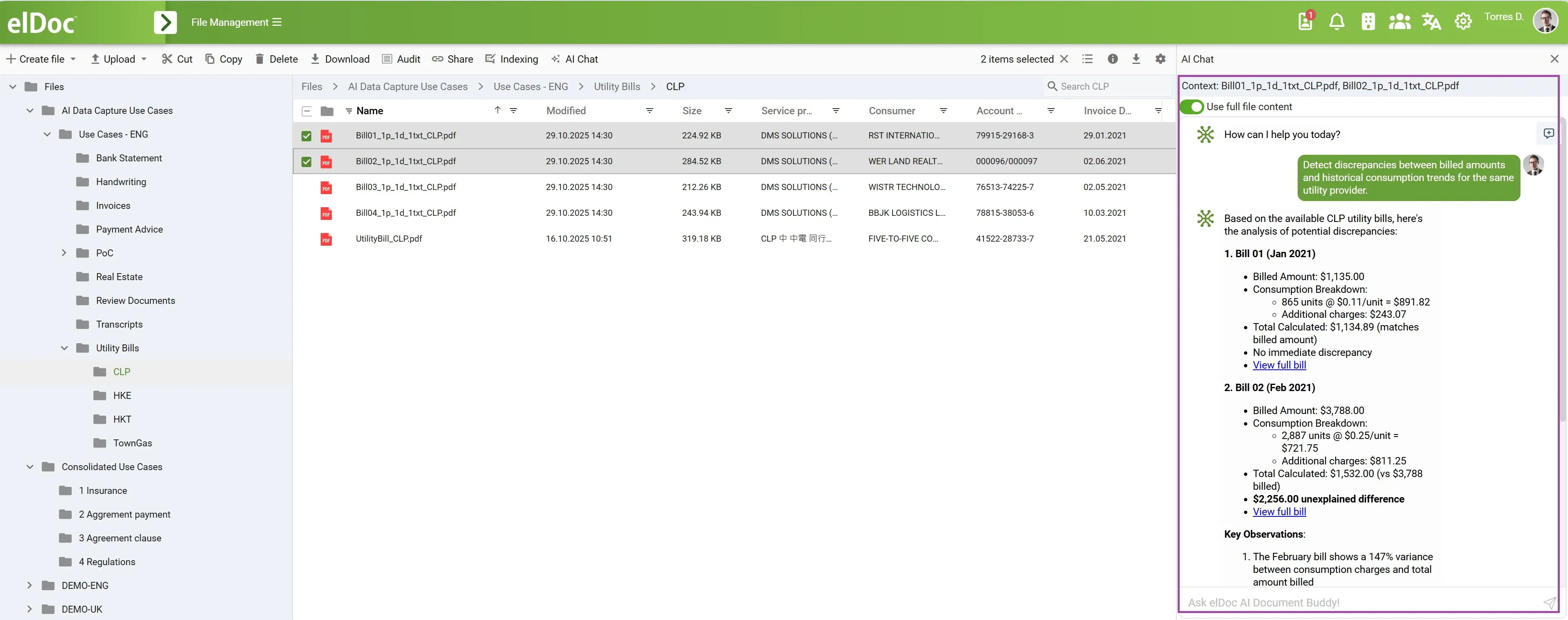
Once data passes validation, GenAI can perform deep, contextual analysis across bills and time periods.
Unlike rule-based validation, this analysis focuses on behavior, trends, and anomalies that require reasoning.
GenAI can analyze:
- Consumption patterns across sites or meters
- Cost increases without corresponding usage growth
- Seasonal deviations
- Provider pricing behavior
- Long-term trends and emerging risks
This analysis works across multiple documents, not just a single bill.
Example GenAI Prompts
“Analyze electricity consumption across all sites for the last six months and identify abnormal usage patterns.”
“Detect discrepancies between billed amounts and historical consumption trends for the same utility provider.”
“Identify potential over-usage or leakage risks based on water consumption patterns.”
“Compare utility costs year-over-year and highlight unexplained increases.”
“Summarize utility bills that exceed expected thresholds and explain the likely cause.”
5. Intelligent Classification, Grouping, and Auto-Filing of Utility Bills
elDoc manages classification, grouping, renaming, and secure filing in two distinct ways: automated system-driven processing or user-initiated prompt-based actions. In automated mode, elDoc operates continuously based on predefined system instructions, classifying utility bills, extracting key attributes, applying standardized naming conventions, and filing documents into the correct folders without any user interaction. However, elDoc also supports prompt-based control, allowing users to issue natural-language instructions such as “classify these utility bills and organize them by vendor and billing period”, upon which GenAI dynamically performs classification, regrouping, renaming, and refiling on demand. In both cases, all actions are executed within elDoc’s secure document management framework, enforcing role-based access, permissions, and full audit trails by default.
Intelligent Classification
Using a combination of OCR, computer vision, and embedded LLMs, elDoc understands the content, context, and business meaning of each utility bill. The platform accurately identifies the document type and extracts key attributes such as utility category, vendor, company or client name, account or meter number, service location, and billing period regardless of how the document is formatted or named. This content-based classification ensures reliable handling even when layouts or provider formats change.
Smart Grouping
Based on classification results, elDoc automatically groups utility bills according to business logic. Documents can be organized by utility type, vendor, company or legal entity, account or meter identifier, location or facility, and billing period. Folder structures can follow predefined organizational standards or dynamically adapt as new vendors, accounts, or sites are introduced, without requiring manual configuration.
Automatic Renaming
To ensure consistency and improve searchability, elDoc applies automatic file renaming using structured metadata extracted from each document. File names are standardized to clearly reflect the document’s content, making utility bills immediately understandable, easy to locate, and audit-ready—without manual cleanup or intervention.
Secure Auto-Filing
Once classified, grouped, and renamed, utility bills are automatically filed into the correct folders within elDoc’s secure document management environment. Role-based access control, permission policies, and full audit trails are enforced by default, ensuring that sensitive financial and compliance-related documents are protected at all times.
From Utility Bills to Intelligent Workflows
Utility bills don’t have to slow your teams down. With elDoc, utility documents are captured from any source, understood in any format, and processed end to end—automatically and securely. From intelligent data extraction and validation to auto-classification, filing, and workflow automation, elDoc removes manual effort while ensuring accuracy, governance, and audit readiness.
More importantly, elDoc turns utility bills into actionable insight—helping you detect discrepancies, control costs, and respond faster, all by simply asking the right questions.
Stop managing utility bills manually. Try elDoc and experience end-to-end GenAI automation from day one.